ARKit Room plan software development services
Looking to capture accurate 3D floor plans without lidar hardware? Our engineers harness Apple’s RoomPlan API to convert simple camera scans into detailed room models, ready for real-life workflows. Recognized on Clutch for AR excellence, Volpis has spent years providing ARKit room plan software development services to craft innovative solutions for businesses across diverse industries.

Years of Experience
In-house talents
Projects

OUR ACHIEVEMENTS
Trusted & awarded software development partner



CLIENTS
Our clients – businesses, from startups to enterprises
It’s been a great honor to provide software design and development services to our esteemed clients.





ARKIT ROOM PLAN DEVELOPMENT EXPERTISE
ARKit room plan software development expertise we provide
At Volpis, we use ARKit’s room planning technology to build advanced AR applications. Our developers have extensive experience in creating immersive experiences that blend seamlessly with the real world, enhancing user interactions with virtual elements. With ARKit’s advanced capabilities, our apps on iOS devices provide users with a better sense of how virtual objects fit into their physical space.

Creating a 3D model of an interior room
We can create a 3D model of a room, which reduces the efforts needed to produce detailed 3D floor plans or prepare new interior designs. This process is particularly useful for real estate agents and interior designers who want to showcase new furniture or lighting conditions in a space. With AR apps, users can visualize how different furniture pieces would look in their rooms, helping them make more informed decisions about their interior design.

Generating a 2D floor plan
Leveraging the measurements obtained through RoomPlan’s room scanning capabilities, we can accurately draw a detailed 2D plan of the room. This feature is particularly useful for real estate agents and developers who need accurate floor plans for marketing purposes. By using AR technology, our apps can generate detailed floor plans quickly and accurately, saving time and effort. With the RoomPlan API, developers can integrate innovative functionality into your augmented reality app, opening up new possibilities for indoor navigation and virtual elements placement.

Saving and exporting
RoomPlan data
We can create functionality for saving/sharing/exporting room plan data to the USD file format. This file format describes 3D scenes and allows users to collaboratively work on them across different 3D programs. This capability is beneficial for industries like architecture and interior design, where collaboration on room plans is crucial. With Volpis’s AR development expertise, clients can create immersive experiences that help users navigate complex environments like shopping malls or large office buildings. Our AR applications enable users to determine how virtual objects interact with their real-world environment, making it easier to envision new designs or layouts.
ARKIT ROOM PLAN APP USECASE
How ARKit Room
plan app works
AR APP DEVELOPMENT TOOLS
AR technologies we work with
IOS
Android
HOW TO HIRE ARKIT ROOM PLAN APP DEVELOPERS
Steps to hire an ARKit Room plan app developer from us
Intro Call
- Discuss your business needs and objectives.
- Review potential collaboration models tailored to your project.
- Learn about our experience, successful Room plan app development projects, and pricing.
Proposal
- Receive a tailored proposal within 72 hours.
- Detailed timelines, deliverables, and transparent pricing will be outlined.
Start Collaboration
- Kick off with a dedicated ARKit developer.
ARKIT ROOM PLAN APP DEVELOPERS YOU CAN COUNT ON
Why hire ARKit Room plan developers from Volpis?

AR Expertise
With years of experience in AR development, we leverage powerful frameworks such as ARKit, SceneKit, RoomPlan, Metal, and RealityKit to build custom solutions for your business.

Tailored Talent
Choose from a diverse range of ARKit Room plan software developers (Junior to Senior) to perfectly fit your project’s needs and budget.

Uncompromising Quality
We adhere to 30 delivery quality standards to create AR apps utilizing the RoomPlan framework, while maintaining rigorous quality standards throughout the entire project lifecycle.

Team Scalability
Our flexible outstaffing options allow you to scale your ARKit Room plan development team up or down based on project demands, without hiring full-time employees.

Seamless Communication
Get direct, day‑to‑day communication with the ARKit developers building your product – so feedback is instant, and collaboration stays friction‑free from kickoff to release.

End-to-End Services
Beyond AR app development services, we offer expertise in mobile, web, UX/UI design, business analysis, and testing, making us your comprehensive tech partner.

Risk-Free Trial
Experience our skills firsthand with 40 free development hours, allowing you to evaluate our ARKit Room plan software development services before committing.
Security
and IP Protection
ARKIT ROOM PLAN APP DEVELOPMENT SERVICES
ARKit Room plan development services we offer
RoomPlan Integration or Optimization for Existing iOS Apps
End-to-end development
In-team ARKit Room plan developer
Cooperation model
Ongoing support: Whether you’re looking to add RoomPlan to your iOS app or fix an existing integration, we’ve got you covered. Our team handles everything from initial setup to debugging and performance tuning – without disrupting your architecture or roadmap.
Best fit for
Organizations that:
- Want to add RoomPlan but lack in-house ARKit expertise
- Already use RoomPlan but face bugs, crashes, or poor performance
- Need fast, accurate room capture without draining internal resources
What you get
- RoomPlan setup or full audit of your current integration.
- Crash and performance fixes (battery, thermal, stability)
- Compatibility with the latest ARKit and iOS versions
Outcome You Can Expect: The result is a stable, fast, and scalable RoomPlan experience your users can trust. From fixing performance issues to enhancing exports and UI flows, we bring RoomPlan up to production-ready standards. Your app stays on track – no rebuilds, no internal distractions.
Cooperation model
Product development: A full-cycle partnership that takes you from idea to App Store. We handle discovery, design, engineering, and launch, delivering a production-ready ARKit Room Plan app that fits your exact business goals.
Best fit for
Organizations launching a new AR app that need guidance through concept validation, UI/UX design, technical architecture, and full-stack development – mobile, backend, web dashboards, and spatial features included.
What you get
- Discovery workshops to define goals, map user pain points, and test AR-powered solutions
- Wireframes, visual design, and interactive Room Plan prototypes
- End-to-end engineering and testing: AR measuring, configurator, navigation, 3D mapping, server logic, APIs, admin tools, etc.
- Launch support, analytics setup, and first-release maintenance.
Outcome You Can Expect: A scalable, high-performance augmented reality application that lets users capture spaces, visualize furniture, and preview renovations with a swipe.
Cooperation model
Staff augmentation: Our experienced ARKit developers join your in-house team on a full- or part-time basis, working inside your existing sprints, tools, and rituals.
Best fit for
Organizations that already have an established team but need extra capacity or niche spatial-mapping skills to speed up delivery, add new features, or tackle a short-term spike in workload.
What you get
- Mid- to senior-level RoomPlan specialists dedicated to your backlog
- Rapid ramp-up / ramp-down aligned with project milestones
- Code reviews, performance tuning, and RoomPlan best-practice mentoring
- Knowledge transfer sessions and documentation to upskill your in-house team
Outcome You Can Expect: Accelerated AR feature delivery, smoother workflows, and an immediate boost in RoomPlan expertise – without the cost and delay of permanent hiring.
Showcase
Our recent ARKit Room
plan app development projects
Room Xpand
AR Scanning App
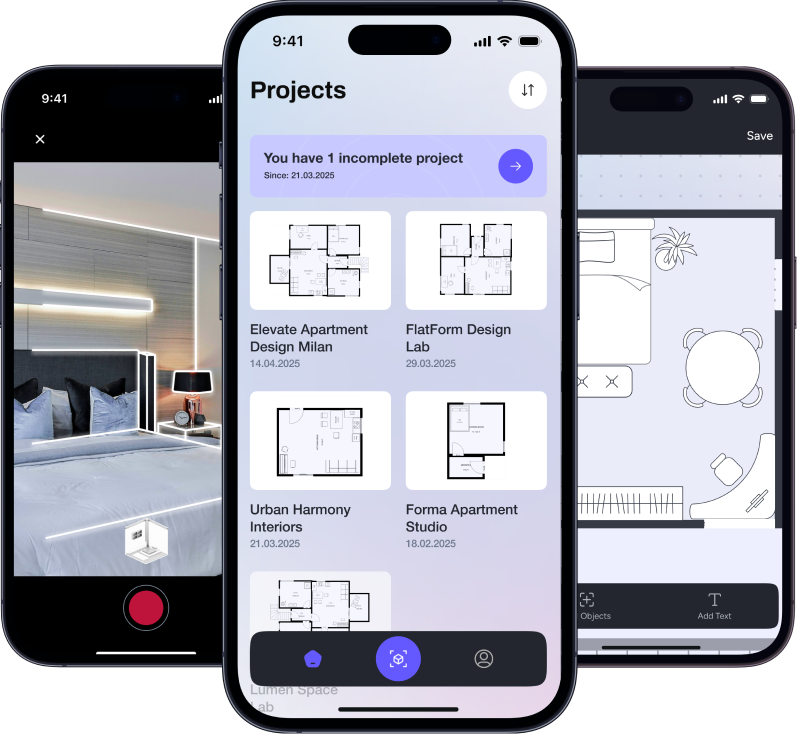
Room Xpand turns any iPhone into a handheld LiDAR scanner, streaming real-time 3D room meshes and precision 2D floor plans. Built on ARKit depth APIs and Volpis’ custom point-cloud pipeline, the app converts LiDAR scans into detailed, editable spatial models. From discovery through full-cycle iOS design and development, we focused on accuracy and performance, allowing the app to be used for on‑site measurements.
Testimonials
Our commitment to excellence is reflected in the glowing reviews from our clients, who consistently praise our dedication to delivering exceptional results. It’s been a great honor to provide app development services to our esteemed customers.
Though the product is not yet launched, Volpis hat met all deadlines and budget given. They have been amazing in application and communication. Moreover, the deliverables are of high quality.
James Parkes, Founder My-Day
The MVP was created successfully and saw success in the client’s current market. Volpis excelled at communicating and coordinating with the internal team. Customers can expect high-quality output from the team.
Co-Founder, Health Startup
The app developed by Volpis is performing flawlessly and is projected to succeed in the market. Throughout the course of the project, the team continuously exceeded expectations to perform. They had great communication skills and notified the client quickly of anything.
Founder, Fit Society LLC
The app has received significantly more downloads. The speed of Volpis’ work and their technical expertise are highlights of the engagement. Their strategic insight is appreciated.
Jason Marvel, CEO FlowMSP
Must-read before you hire ARKit Room plan expert
Augmented reality, Software development
Apple’s RoomPlan overview: leveraging augmented reality for app development (2026)
Augmented reality, Software development
Top use cases for apps utilizing Apple’s RoomPlan (2026)
Augmented reality, Indoor navigation & positioning, Software development
A complete guide to developing augmented reality indoor navigation applications (2026)
Hire ARKit Room plan app developer
We would be happy to answer all your questions
and help make your project a total win!
Looking for other experts?
Questions & Answers
FAQ
What is Apple’s ARKit?
Apple’s ARKit is a development framework that allows developers to create augmented reality experiences for iOS devices. With ARKit, developers can integrate augmented reality into their apps, enhancing the user experience by overlaying digital content onto the real world. This technology leverages the camera and sensors to track the device’s position and enable realistic AR experiences.
What devices are supported by ARKit?
ARKit is supported on a wide range of iOS devices, including iPhones and iPads. The framework takes advantage of the advanced camera and sensor capabilities of these devices to deliver high-quality augmented reality experiences. By utilizing ARKit, developers can create AR apps that cater to a broad audience of iOS users, ensuring a seamless and engaging AR experience across different devices.
Why is ARKit better than the alternatives?
ARKit stands out as a premier choice for AR development due to its robust, notable features and seamless integration with iOS devices. Unlike other AR development platforms, ARKit provides developers with advanced tools for scene recognition, image recognition, and spatial mapping, allowing for more immersive and interactive AR experiences. Additionally, ARKit’s compatibility with various iOS devices ensures a wide reach and accessibility for users, making it a superior choice for creating AR apps.
How does ARKit work?
ARKit works by utilizing the camera and sensors of iOS devices to track the position of the mobile device and its orientation in the real world. It also detects horizontal surfaces, such as floors and tables, to anchor digital content in the physical environment. By combining camera images with motion sensor data, ARKit can create a virtual representation of the real world, enabling developers to overlay digital objects seamlessly and create immersive AR experiences.
How to create a room layout?
Creating a room layout with ARKit involves utilizing its capabilities for spatial mapping and scene recognition. Developers can use ARKit to scan the environment and detect walls, floors, and other objects in the room. By leveraging ARKit’s tools for object placement and manipulation, developers can then add virtual furniture and other elements to create a realistic room layout. This process allows users to visualize how furniture and decor will look in their space, making it ideal for interior design and real estate applications.
What is augmented reality?
Augmented reality (AR) is a technology that overlays digital content onto the real world, enhancing the user’s perception of their environment. AR uses devices like smartphones or AR glasses to blend digital objects, such as 3D models or information overlays, with the physical world. This technology allows users to interact with virtual elements in a real-world context, opening up new possibilities for gaming, education, shopping, and more.
What is Apple Roomplan?
Apple Roomplan is a feature within ARKit that allows developers to create apps for planning and visualizing room layouts. With Apple Roomplan, developers can leverage ARKit’s spatial mapping and scene recognition capabilities to create virtual representations of rooms. Users can then interact with these representations to place furniture, decor, and other objects, allowing them to visualize and plan their physical space in a digital environment.
What is image recognition?
Image recognition is a technology that allows computers to identify and interpret images. With image recognition, computers can analyze the contents of an image and recognize objects, patterns, or text within it. This technology is often used in AR applications to enable object recognition and tracking, allowing digital content to interact with real-world objects and surfaces.
What is the difference between SLAM and visual inertial odometry?
SLAM (Simultaneous Localization and Mapping) and visual inertial odometry are both techniques used in AR to track the position and orientation of a device in the real world. SLAM works by mapping the environment and tracking the device’s position relative to that map, while visual-inertial odometry uses visual and inertial sensor data to estimate the device’s motion.
What is an AR immersive experience?
An AR immersive experience is an augmented reality experience that fully immerses the user in a digital environment. In an AR immersive experience, digital content is seamlessly integrated into the user’s surroundings, creating a sense of presence and interaction with virtual objects. This type of AR experience is often used in gaming, education, and training applications to provide users with a highly engaging and interactive experience.
What is the difference between VR and AR experience?
The main difference between virtual reality (VR) and augmented reality (AR) experiences is the level of immersion and interaction with the virtual environment. In VR, users are fully immersed in a digital environment and typically interact with it using specialized VR headsets and controllers. In contrast, AR overlays digital content onto the real world, allowing users to interact with virtual objects in a real-world context using devices like smartphones or AR glasses. AR enhances the user’s perception of the real world, while VR creates a completely virtual environment.
How to improve the AR app’s performance?
Improving an AR app’s performance involves optimizing various aspects of the app, such as rendering, tracking, and interaction. Developers can improve rendering performance by optimizing 3D models and textures, reducing the number of polygons and the size of textures. They can also improve tracking performance by optimizing sensor data processing and using advanced tracking algorithms. Additionally, optimizing interaction performance involves ensuring smooth and responsive user interactions, such as object placement and manipulation. By optimizing these aspects, developers can enhance the overall performance and user experience of their AR apps.
Got a project? Let’s talk
Email us
Project inquiry:
sales@volpisstg.wpengine.com
Other questions:
info@volpisstg.wpengine.com