
Getting your app to the App Store isn’t easy. According to Apple’s 2024 App Store Transparency Report, Apple rejected roughly 25% of app submissions (1.93 million). But rejection isn’t the end. Of those 1.93 million, 295,109 apps were approved after developers fixed the issue. But the time was already wasted, and the delay pushed the launch back.
The same problems keep appearing across teams, which means they’re learnable and can be avoided.
The App Store review process follows guidelines that are public, rule-based and largely predictable. Teams that understand it, ship faster. Teams that don’t get educated by rejection emails – after the delay, after lost momentum, after a missed launch window.We’ve built dozens of apps and seen these patterns firsthand. This article covers the 11 most common app store rejection reasons: why each happens, how to avoid it, and what we’ve learned from our own submissions.
11 Most Common App Store Rejection Reasons
Here’s the full list before we go deep on each point:
| Rejection Reason | Apple Guideline |
|---|---|
Unsafe or Restricted Content | 1.1 – Objectionable Content |
Broken or Incomplete Functionality | 2.1 – App Completeness |
Non-Functional Demo / Login Credentials | 2.1 – App Completeness |
Misleading App Store Metadata | 2.3 – Accurate Metadata |
In-App Purchase & Payment Bypass | 3.1 – Payments |
Unaccepted Business Models | 3.2 – Business |
Poor User Experience or UI Defects | 4.0 – Design |
Keyword Stuffing & Spam Practices | 4.3 – Spam |
Privacy & Data Collection Violations | 5.1 – Privacy |
Excessive or Irrelevant Permissions | 5.1 – Privacy |
Missing In-App Account Deletion | 5.1 – Privacy |
Safety issues
Safety issues fall under Apple Guideline 1. Though the guideline has seven detailed sub-points, one issue caused the most rejections in our experience.
1. Unsafe or Restricted Content
Apple holds developers accountable for what users create and share inside their apps. If your platform supports user-generated content (UGC) and you haven’t built a moderation layer, you’ll get rejected. This applies to chat, comments, media uploads, and profiles.
Apps with hate speech, graphic violence, or adult content, that don’t incorporate propper age gating face rejection under Guideline 1.1. Age ratings aren’t self-reported suggestions – Apple verifies them against your actual content.
How to mitigate it:
- Build a content moderation layer before you submit. A basic flagging and review system satisfies Apple’s requirements.
- Set accurate age ratings and justify every content category Apple asks about.
- For adult content, implement real age verification – not just a checkbox.
- Surface your moderation policy inside the app and document it in your App Review Notes.
Performance issues
Performance issues are covered by Apple Guideline 2. According to Apple’s 2024 App Store Transparency Report, performance issues were the number one cause of app rejections – accounting for more than 1.23 million rejections that year.
2. Broken or Incomplete Functionality
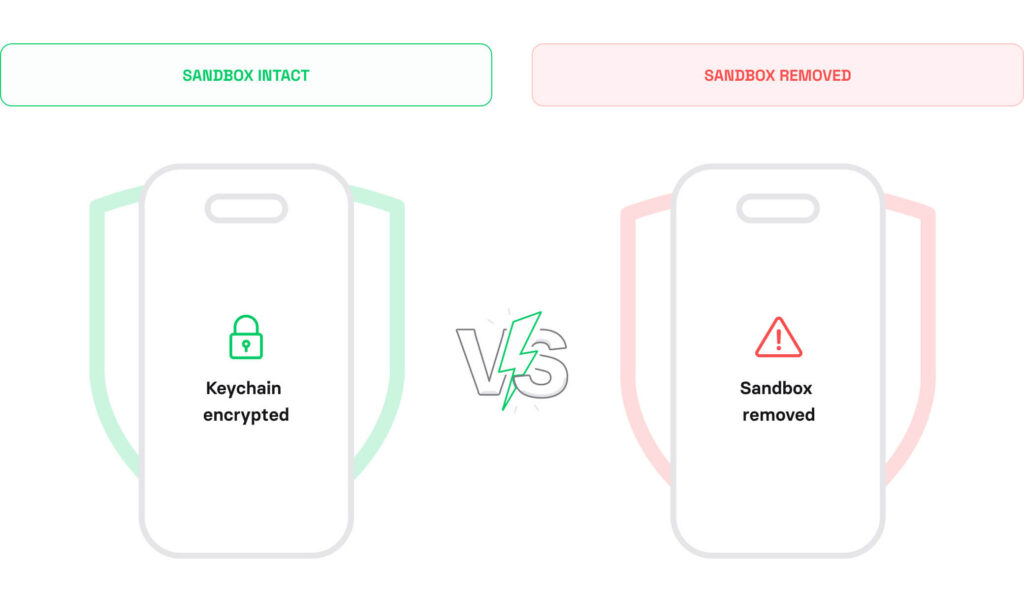
The app store review team tests your app like a real user. Crashes, dead-end flows, placeholder content, and debug builds all trigger rejection under Guideline 2.1.
This sounds obvious – but it still happens. Teams push to hit a deadline, skip a final QA pass, and find out two days later that the reviewer crashed on the onboarding screen.
How to mitigate it:
- Test every user flow end-to-end on a real device, not just the simulator.
- Disable or hide any feature that isn’t production-ready before you submit.
- Make sure your build points to production infrastructure, not dev or staging.
- If your app requires a login, provide Apple with fully functional test credentials (more on this in the next Reason).
On a fleet-tracking client app, rejection came from a device we’d quietly deprioritized in QA – an iPhone SE running iOS 15. A layout constraint that worked fine on newer devices collapsed on the smaller screen, making a key CTA button unreachable. The reviewer couldn’t complete the ride flow. We hadn’t dropped iOS 15 support in our App Store listing, but we’d stopped testing against it.
Rule: Every screen size and OS version in your supported range needs a seat in your test, not just the devices your team owns.
This is the kind of pre-submission gap our mobile app development services are built to catch.
3. Non-Functional Demo / Login Credentials
Apple’s reviewers need to log in and test your app like a real user. If your test credentials don’t work, require 2FA they can’t complete, or only access a paywalled version with no explanation, the review stops before it starts.
Credential failures are fixable in under 10 minutes. Yet they account for a disproportionate share of week-one rejections, and have nothing to do with your app’s quality.

In our experience, reviewer credential issues are one of the most common first-week App Store rejections for teams submitting their first app. The rejection message rarely says “your credentials didn’t work.” It typically reads “we were unable to complete testing,” which teams often misread as a technical bug rather than an access problem.
– Yurii, iOS Developer
How to mitigate it:
- Include working demo credentials in the App Review Notes field inside App Store Connect.
- Disable SMS or authenticator-based 2FA for reviewer test accounts.
- If core functionality sits behind a paywall, unlock it on the reviewer account or explain in the notes how to access it.
- If your app requires specific hardware – Bluetooth devices, NFC, or AR equipment – flag this clearly and explain the expected reviewer experience.
4. Misleading App Store Metadata
Your listing is part of the review. Screenshots that don’t match the real UI, descriptions that promise features you haven’t shipped yet, and app names that imply Apple affiliation all violate Guideline 2.3.
Apple cross-references your metadata against the actual app. A metadata rejection signals that you’re inflating conversions through misleading presentation, and that’s a violation.
How to mitigate it:
- Use real app screenshots, not marketing renders or idealized mockups.
- Match your description to the features in the build you’re submitting right now.
- Skip unsubstantiated claims like “#1” or “best-in-class.”
- Don’t use Apple product names – iPhone, Siri, Face ID – in your app title.
We built an iOS app for prize draws. One of the App Store screenshots had placeholder text under it – “Catch a break” – left over from an early design stage.
The reviewer read it as a feature description, went looking for it in the app, and rejected it for misrepresenting functionality.
Rule: Reviewers take everything on your App Store page, including text you include there as a placeholder. Check every screenshot before you submit.
Business issues
Business models and payment violations differ from every other rejection category. They’re rarely accidental – they originate from architectural decisions made early in development.
5. In-App Purchase & Payment Bypass
IAP rejections come from two sources – and most developers watch only one.
The first is technical: routing payments outside Apple’s system or implementing StoreKit incorrectly. The second is behavioral: designing a paywall in a way Apple treats as manipulative. Both will stop your app from shipping.
5.1 Payment Routing Violations (Guideline 3.1)
Apple’s revenue share depends on in-app purchase (IAP) enforcement. Any attempt to route purchases outside the App Store ecosystem violates Guideline 3.1. This includes linking to a website checkout, mentioning a lower price elsewhere, or adding a “subscribe on our website” button.
Physical goods and services consumed outside the app are exempt. But any digital content – subscriptions, premium features, or virtual items – must go through Apple’s IAP system.
However, there is one notable exception. If the app operates across multiple platforms (web, Android, desktop), users who purchased a subscription outside the app can access it inside the app under Guideline 3.1.3(b). Youtube or Spotify are good examples of it. But it comes with a hard condition: the same subscription must also be available through Apple’s IAP inside the app, and you cannot direct users toward the cheaper web option from within the app itself.
How to mitigate it:
- Use Apple’s IAP API for all digital content, unlocks, and subscriptions.
- Remove external payment links for digital goods, even indirect ones.
- Don’t reference pricing outside the in-app purchase flow for in-app content.
- Implement StoreKit correctly – subscription logic, restore purchases, and receipt validation all need to follow Apple’s standards.
- Create all IAP products in App Store Connect and attach them to the app binary before submitting. Apple reviews the app and IAP products together. Missing or unattached products will block the review, even if your StoreKit implementation is technically correct.
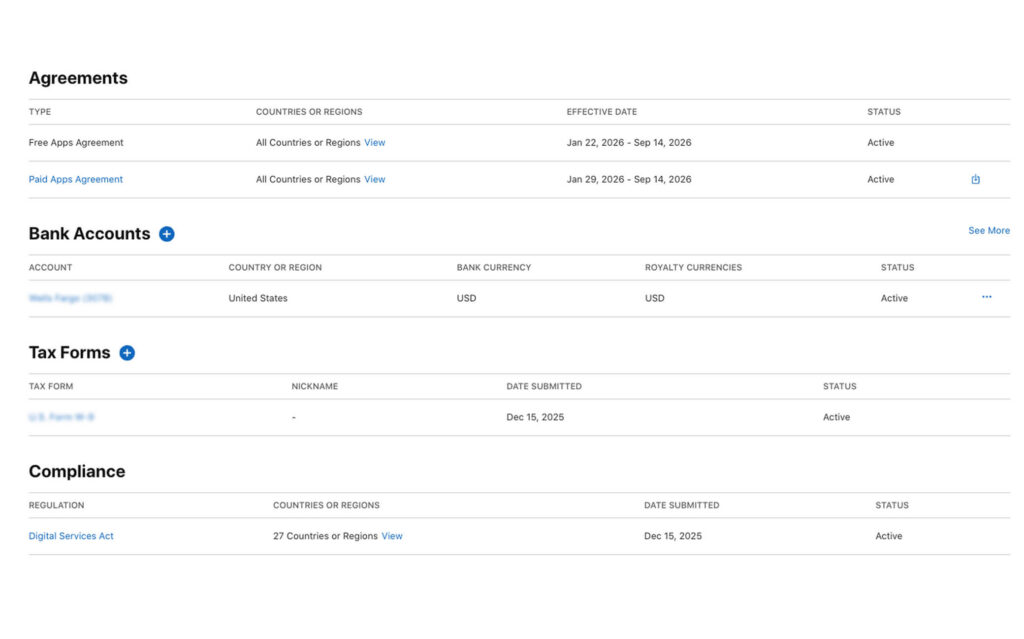
- Make sure the Account Holder has accepted the Paid Applications Agreement in App Store Connect before submitting. Without an active agreement, IAPs won’t work in Apple’s sandbox environment and the review team can’t complete their testing.
The EU Digital Markets Act now requires Apple to allow alternative payment methods for apps distributed on the EU App Store. For teams with European users, Guideline 3.1 is no longer a universal rule – what triggers a rejection globally may be permitted in the EU under a compliant alternative payment implementation. This does not affect the global default, and it does not extend to Guideline 3.1.2 paywall UX requirements, which apply regardless of region.
5.2 Subscription Paywall Dark Patterns (Guideline 3.1.2)
A correct StoreKit implementation isn’t enough if the paywall itself fails review. Guideline 3.1.2 governs auto-renewable subscriptions specifically, and Apple’s reviewers test the purchase flow end-to-end – including the UI.
How to mitigate it:
- The price shown on your paywall must exactly match what is set in App Store Connect. Any discrepancy, including currency formatting differences, will fail review.
- The Restore Purchases button must be visible without scrolling or navigating away from the paywall screen.
- Trial terms must be explicitly explained. Users must know exactly when they will be charged and for how much before they subscribe.
- Default pre-selection of the most expensive tier without clear user intent is treated as a manipulative pattern.
- If lower-priced options exist, they cannot be visually suppressed or buried to push users toward a more expensive option.
- All CTA texts should match the action. A button that reads “Start Free Trial” when no trial exists, or “Get Premium” when the user is restoring a purchase, will be flagged.
App Review validates in-app purchases using Apple’s sandbox environment and a test Apple ID, not real transactions. Subscription renewals are accelerated (for example, a 1-month subscription renews about every 5 minutes), and receipts are issued from sandbox App Store servers. Because Xcode’s local StoreKit testing simulates transactions rather than using Apple’s servers, an implementation that passes local tests can still fail during review if the sandbox transaction flow triggers untested logic.
6. Unaccepted Business Models
Apple targets low-effort apps that dilute the App Store experience. Template-generated apps with no customization, apps that wrap a mobile website, and explicitly prohibited models – multi-level marketing, binary options, certain gambling mechanics – are covered under Guideline 3.2.
If your app’s core value is something a browser handles better, Apple may reject it. The bar isn’t just functional – it’s whether the app format genuinely justifies a spot on someone’s home screen.
How to mitigate it:
- Build native functionality that justifies the iOS format – push notifications, device sensors, offline capability, or hardware integrations.
- Make sure your app’s core value is clear and demonstrable. If it takes more than 60 seconds to explain why this needs to be an app, revisit the scope.
- Avoid business models that Guideline 3.2 calls out explicitly. Read it before you build around a monetization mechanism you’re unsure about.
If you’re wrapping web content, add meaningful native integrations. Don’t just skin a WKWebView.
Design issues
Design issues are the third most common app store rejection category – accounting for 378,300 rejections in Apple’s 2024 App Store Transparency Report. Design failures are the most visible. Performance bugs can be subtle: design problems are what a reviewer sees in the first few seconds.
7. Poor User Experience or UI Defects
Apple’s Human Interface Guidelines (HIG) aren’t just recommendations. Deviating without good reason, or shipping a UI that looks unfinished – gets your app flagged under Guideline 4.0. This includes non-standard navigation, low-resolution assets, and layouts that break on certain screen sizes.
Apple reviewers test on real hardware. If your layout breaks on an iPhone SE or your custom tab bar misbehaves on a Pro Max, they’ll catch it.
How to mitigate it:
- Test across all supported screen sizes – from iPhone SE (4.7″) through iPhone 17 Pro Max (6.9″).
- Export all image assets at @1x, @2x, and @3x for pixel-perfect rendering.
- Use native UIKit or SwiftUI components where possible. Custom controls must work flawlessly, not just look good in the happy path.
- Read the HIG. Navigation patterns, gesture handling, and typography all have documented standards.
8. Keyword Stuffing & Spam Practices
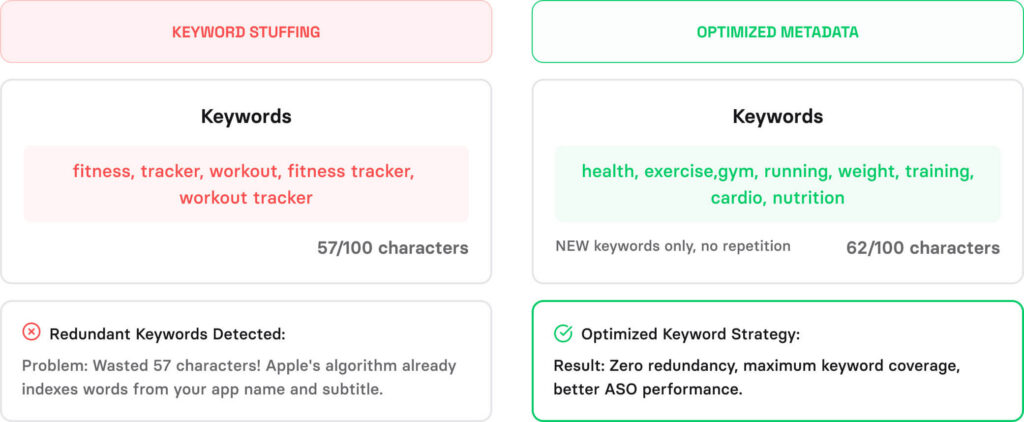
Keyword stuffing, and metadata tricks to game App Store search all fall under Guideline 4.3. Apple’s enforcement is stricter than most teams expect – repeated violations move from app-level to account-level consequences.
How to mitigate it:
- Use your 100-character keyword field strategically. Don’t duplicate terms already used in your title or subtitle.
- Only put keywords in your app name if they’re part of your brand or core functionality.
- One app per concept. If you’ve got multiple use cases, consolidate – don’t create separate thin apps.
- Focus on keyword relevance, not volume. Apple’s algorithm rewards accuracy, not stuffing.
Legal issue
After performance, legal issues are the second most common cause of app rejection, accounting for 445+ thousands cases in Apple’s last App Store Transparency Report.
9. Privacy & Data Collection Violations
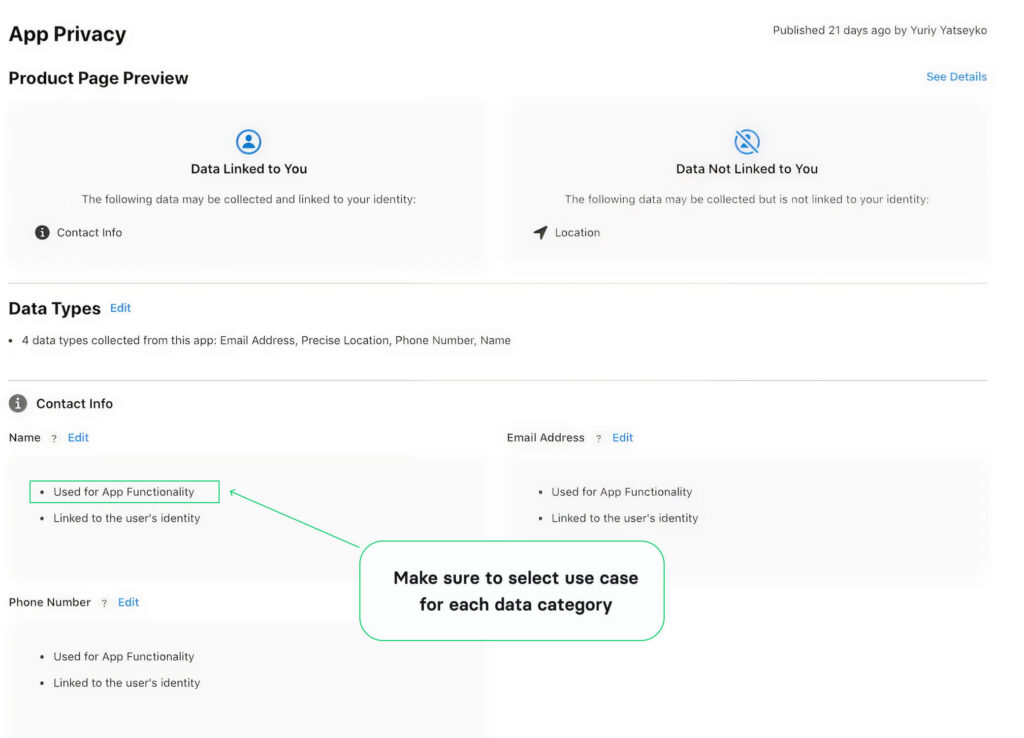
Since iOS 14, Apple has enforced App Tracking Transparency (ATT) with real consequences. Every category of data your app collects must be declared in App Store Connect. The declared use must match actual behavior.
Missing a privacy policy link, collecting more data than your stated purpose justifies, or failing to include a PrivacyInfo.xcprivacy file – any of these stops your submission. That applies to third-party SDKs too. If an analytics platform or ad network in your build collects data that isn’t covered in your declarations, Apple will reject the app regardless of whether your own code is clean.
How to mitigate it:
- Complete the App Privacy nutrition labels in App Store Connect for every data type and use case.
- Link to a valid, published privacy policy from both your app and your App Store listing.
- Only collect data you actively use. Apple checks for overreach.
- Audit every third-party SDK in your build. Check what data each one collects and make sure it’s covered in your privacy policy and App Store Connect declarations.
- Declare usage reasons for all Required Reason APIs in your PrivacyInfo.xcprivacy file. This is separate from data collection declarations – APIs like UserDefaults and file timestamp access require explicit justification even if no personal data is involved. Missing declarations trigger ITMS-91061 errors at submission.
- If your app targets children, COPPA compliance is non-negotiable. Review Apple’s Kids category requirements carefully.
For full pre-submission testing, see our iOS app security checklist article.
Apple maintains a list of Required Reason APIs – system APIs flagged as fingerprinting risks, including UserDefaults, file timestamps, disk space, and active keyboard access. Since May 2024, using any of these without declaring a reason in your PrivacyInfo.xcprivacy file will get your submission rejected. The error you’ll see is ITMS-91053: Missing API declaration.
This is separate from your privacy nutrition labels. A complete data collection declaration won’t protect you here – these are API usage reasons, not data types, and they need their own entries with reason codes from Apple’s approved list.
One more catch: the manifest requirement applies to third-party libraries too. If an SDK in your build uses a Required Reason API without its own PrivacyInfo.xcprivacy, the rejection is yours.
See the full list of Required Reason APIs and approved reason codes.
10. Excessive or Irrelevant Permissions
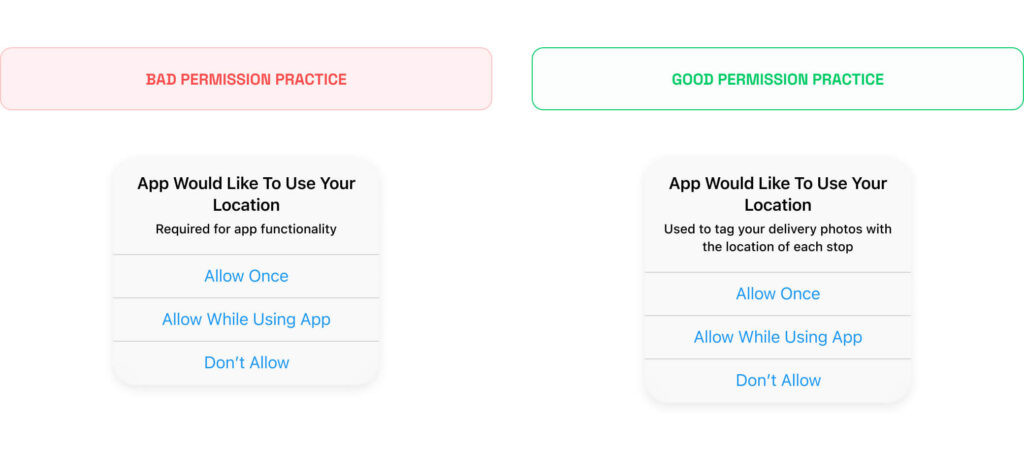
Requesting access to camera, contacts, microphone, or location without clear justification – or requesting permissions your app doesn’t use – is a red flag under Guideline 5.1. Apple audits NSUsageDescription strings and checks whether permissions are proportional to what your app actually does.
Over-permissioning doesn’t just risk rejection. It damages user trust at the permission prompt, which hurts conversion and retention even if the app gets approved.
How to mitigate it:
- Write specific, honest NSUsageDescription strings for every permission – tell users exactly why you need access.
- Request permissions contextually, when the user triggers the relevant feature, not at app launch.
- Audit your code for unused permission declarations before you submit.
- Use approximate location when precise location isn’t required. Apple prefers the least-invasive access level.
11. Missing In-App Account Deletion
If your app lets users create an account, Apple requires that they can delete it from within the app. Not just deactivate – delete, with full data removal. This became a hard requirement in 2022 and has been a consistent app store rejection reason since.
How to mitigate it:
- Add a clearly labelled account deletion option inside your app’s settings or profile screen, not behind a support flow.
- Deletion must remove the account and associated data, not just deactivate it.
- If your app uses Sign in with Apple, you must also revoke the user’s Apple ID token when they delete their account.
- For apps in regulated industries where data retention is legally required, you can explain the retention period, but the deletion request itself must still be initiated in-app.
The App Categories Where Guideline Changes Hit Hardest
The guidelines your app was approved under today may not be the guidelines it’s judged against next year. Apple revises its App Store Review Guidelines continuously, and in high-scrutiny categories, falling behind on those changes doesn’t just slow submission down – it can cost you an app that’s already live.
This means guideline changes aren’t something you read once at submission and forget. They need to be on your radar permanently. Subscribe to Apple Developer news, check the guidelines changelog when new iOS versions are announced, and treat any compliance email from Apple as urgent. In most cases Apple will send a warning before a removal happens, giving you a window to fix the issue. Miss that window, or ignore the email, and reinstatement becomes a much harder conversation.
In 2024, Utilities (16,191 apps) and Games (15,122 apps) had the highest removal counts. These are also the categories where Apple updates requirements most frequently.
| Category | Why is scrutiny higher | What it means for submission |
|---|---|---|
Utilities | High volume of thin, low-effort apps | Needs demonstrable functionality beyond what a browser handles |
Games | Gambling mechanics, loot boxes, age ratings | Guideline 4.7 applies; monetisation mechanics reviewed closely |
Healthcare & Medical | User safety implications | Guideline 5.1.3 applies; accuracy claims and data handling reviewed strictly |
Kids | COPPA, child safety | Guideline 5.1.4 applies; no third-party analytics, no behavioural ads |
Finance | Fraud risk, regulatory exposure | Guideline 3.1.1 applies; legal compliance documentation often required |
Gambling | Jurisdiction-specific legality | Requires explicit Apple approval before submission; geo-restriction required |
Source: Apple’s 2024 App Store Transparency Report
If your app falls into any of these categories, the rejection reasons in this article are only part of the picture. Compliance isn’t a one-time check at submission – it’s something you need to revisit every time Apple updates its guidelines.
How to Appeal an App Store Rejection – and When It’s Worth It
Most rejections have a clear fix: read the feedback, update the app or metadata, resubmit. But some situations don’t resolve through resubmission, and the right move is to contact Apple directly through the Resolution Center or request a call.
Here’s the list of issues that often require a direct communication:
Guideline misinterpretation
You’re confident your app meets the guidelines, but the reviewer concluded otherwise. This happens most often (from our practice) with these two guidelines:
- Guideline 4.1 (Copycats/Design Spam). Your app was flagged as a duplicate, but has distinct, differentiating functionality competitors don’t offer. A direct conversation lets you walk the reviewer through what sets your app apart.
- Guideline 4.2 (Minimum Functionality). Your app was called a website wrapper, but it has native features (e.g. hardware integration, offline capabilities, etc) or device-level functionality. Request a call and demonstrate them directly.
Vague rejection notice
Apple’s rejection notes are not complete and don’t explain what’s missing (e.g. just writing “Guideline 2.1”). In such cases, when the reviewer can’t point to a specific reason, you can ask the Resolution Center for clarification.
Rejected for alleged illegal activity
Your app was flagged for breaking the law, and you have reason, or legal counsel, confirming it doesn’t. Don’t just resubmit. A direct appeal is the fastest way to surface what specifically triggered the flag and address it properly.
For complex situations that the Resolution Center alone can’t resolve, request a call.
In our experience, we had a tutoring platform for teachers and students. The app kept getting rejected without a clear explanation of why.
The problem was Guideline 3.1.3(d). 1-to-1 sessions can be processed through third-party payments like Stripe, that part of our implementation was fine. But the reviewer saw that the platform also supported group classes and flagged the entire payment flow, because group sessions must go through Apple IAP.
No rejection notice had said any of this clearly. We only got there by talking to Apple directly.
Fix It Before You Submit, Not After
Look across these 11 reasons for app store rejection and one pattern is clear: most rejections don’t come from hard problems. They come from skipped steps, deadline pressure, and app store submission hygiene failures that surface in the final 48 hours before launch. None of the issues in this article require exceptional engineering to fix. They require a process built into your development cycle before submission, not after a rejection email.
Apple updates its App Store Review Guidelines periodically. This article covers the most common patterns we’ve met so far. The official guidelines should always be your primary source for anything category-specific or recently changed.
If you want a second set of eyes before submission, our iOS app development services include pre-submission review – covering exactly the gaps Apple finds most often. And if you’re still building out your mobile team, our guide to hiring a Swift developer covers the traits that separate developers who ship correctly from those who don’t.
Questions & Answers
FAQ
Do Apple’s guidelines apply differently by app category?
Yes. Apps in healthcare, kids, finance, and gambling face stricter scrutiny, with category-specific requirements on top of the standard app store guidelines. If your app touches any of these domains, study the category-specific sections before you write a line of code.
How long does the Apple review process take?
Apple reviews 90% of submissions in under 24 hours. Complex apps or those flagged for additional scrutiny can take up to seven days. Expedited review is available for critical bug fixes through App Store Connect – but it won’t help if the underlying issue is a guideline violation.
Is TestFlight subject to the same review process?
TestFlight builds go through a lighter beta review – but Apple still checks for guideline violations. Passing TestFlight doesn’t guarantee App Store approval. Don’t treat a successful beta build as a green light for your production submission.
Does Apple reject apps for having too few features?
Yes. Apple flags apps that lack sufficient utility or that replicate built-in iOS functionality. Your app needs a clear reason to exist as a native download. MVPs still need to clear this bar – a stripped-down app is fine, but a near-empty one isn’t.
Can you appeal an Apple rejection?
Yes. Use the Resolution Center in App Store Connect to respond directly to the reviewer. For escalations, submit through the App Review Board. Keep your response factual and specific – explain what you’ve changed and why the app now meets the guideline.
What should I do if Apple keeps rejecting my app for the same reason?
First, make sure you’re fixing the root cause – not just the surface symptom the rejection email describes. Apple’s messages are often general.
If you’ve fixed the issue and are still getting rejected, work through this in order: respond in the Resolution Center with a specific explanation of what changed; request a call with Apple directly through App Store Connect (this is underused but really effective for ambiguous rejections); escalate to the App Review Board if the Resolution Center isn’t moving. If you still can’t isolate the trigger, strip the app down to the smallest build that reproduces the rejection and work from there.
What happens if your developer account is flagged repeatedly?
Multiple violations – especially around spam, payment bypass, or guideline abuse – can escalate to account suspension. If you’re hitting the same rejection repeatedly, you need a root-cause fix to your process, not just a patch on the specific submission.
Can you appeal if your app is removed from the App Store?
Yes, but the success rate is low. Apple’s 2024 App Store Transparency Report shows only 1.6% of app removal appeals succeeded (421 out of 26,224 submitted). If your app has been removed, use the Resolution Center to respond, address the specific violation cited, and submit through the App Review Board for escalation. A removal appeal without a concrete fix rarely succeeds.