

- Full cycle development is when one team takes a product from the initial idea through design, development, testing, launch, and ongoing support.
- The core stages of full cycle software development include design, development, testing, and deployment in a continuous flow from idea to production, along with pre-development and post-launch phases.
- Discovery and pre-development often save more money than the build itself by stopping the wrong product before it ever gets built.
- Work on a product doesn’t stop at release – tracking performance, collecting user feedback, improving, and scaling are just as important.
- The choice between full cycle, staff augmentation, and dedicated teams comes down to what you already have in-house and how big the project is.
The study from the Journal of Management Information Systems reveals that IT projects tend to exceed their budgets by 45% on average. A lot of it comes from treating development like a chain of handoffs instead of one continuous, owned SDLC process.
Building software from scratch is a commitment. It’s not just about writing code – it’s about validating the idea, designing and building the product, launching it, and then improving it over time. Most teams underestimate what happens after launch, but the ones that focus on real usage and iterate quickly are the ones whose products tend to stick.
In this guide, I explore full cycle development based on what I’ve seen work across real production systems – from figuring out if it’s even worth building, through delivery, to the post-launch work that separates shipped products from successful ones.
What is full cycle software development?
Full cycle software development is when one team owns the whole product and covers all the stages of its development – from the initial idea and research through design, development, testing, deployment, and what comes after.
No handoffs. No “throw it over the wall.” The same people who decided what to build are the ones building it, testing it, and fixing it later – so nothing gets lost along the way.
It usually breaks down into three main stages:
- Pre-development: research, validation, planning
- Core development: design, build, testing, launch
- Post-launch: analytics, feedback, iteration, scaling
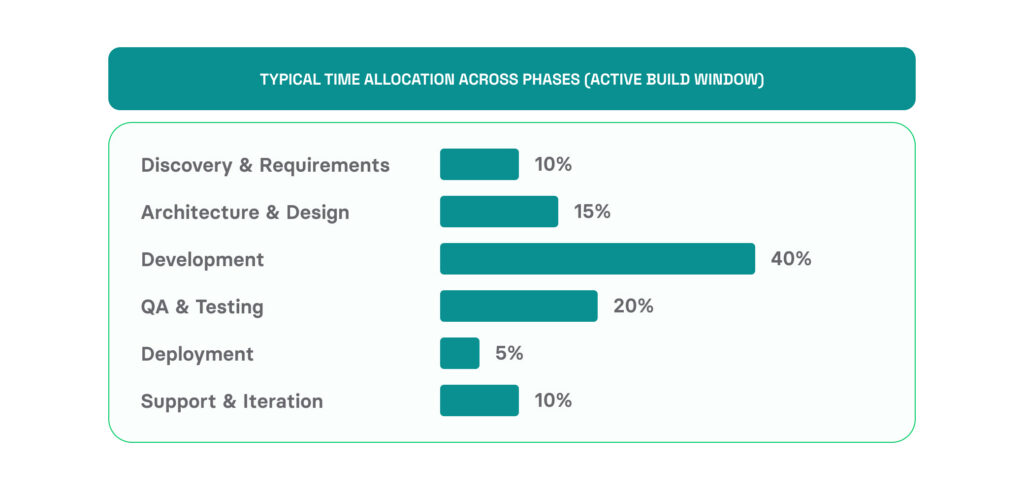
Source: Volpis benchmarks across 40+ production builds (2024-2026)
Because it’s the same team throughout, decisions don’t drift. The people who defined the problem early on are still there later, fixing issues and shaping where the product goes.
Why does full cycle software development matter in 2026?
A Yahoo Finance article puts it bluntly: about 20% of new businesses fail in the first year, and nearly half don’t make it past five. For tech companies, it’s even rougher – Revenue Memo says around 63% fail within that same timeframe.
It’s rarely one bad decision that breaks things – it’s the gaps between teams. Requirements get written, then reinterpreted, then turned into something close but not quite right. QA finds issues no one planned for. Each handoff loses a bit of context, and by launch, the product has often drifted from the original problem.
Full cycle development avoids that. One team owns it from research to post-launch, so context doesn’t slip away. In 2026, that continuity is more important than ever. Build cycles are shorter, users expect more, and there’s less room for a mismatch between what you built and what was actually needed.
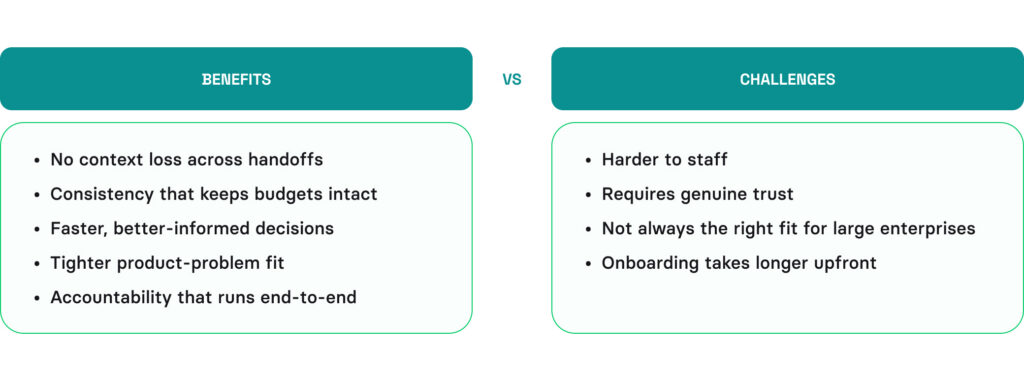
Key full cycle development benefits
Here’s what the consistency of full cycle software development actually brings you:
- No context loss across handoffs. The same team that talked to users is the one building the product. Requirements don’t get distorted between departments, and decisions made in discovery still hold up in QA.
- Consistency that keeps budgets intact. When one team owns the full lifecycle, the plan set in pre-development is the same one carried through to delivery. That means fewer budget surprises from handoffs, less rework when new teams reinterpret earlier decisions, and far less scope creep slipping through unnoticed. In the end, that shared ownership – not tools or process – is what keeps projects from drifting past the original budget.
- Faster, better-informed decisions. When the same people own the full picture, they can make decisions faster without waiting for approvals from teams that aren’t in the loop anymore. This alignment speeds things up across the whole software development process.
- Tighter product-problem fit. Because the team stays close to the original user research the whole way through, the final product is more likely to solve the real problem – not a slightly off version of it that got distorted through handoffs.
- Accountability that runs end-to-end. There’s no finger-pointing between discovery, dev, and QA when things go wrong. One team owns the outcome, which keeps accountability and transparency high and pushes everyone to get it right at every stage.
Major full cycle development challenges
Still, full cycle development comes with its own challenges that the team should take into account:
- Harder to staff. A full cycle team needs people who can work across strategy, design, engineering, and post-launch support. That kind of range is harder to find – and usually harder to keep – than specialists focused on just one phase.
- Requires genuine trust. Giving one team full end-to-end ownership only works if leadership is willing to step back a bit. Teams that are used to heavy oversight at every stage often find that shift hard.
- Not always the right fit for large enterprises. When a product spans dozens of teams, regulatory layers, or legacy systems, full cycle ownership gets harder to draw cleanly. Managing all phases at once can quickly turn into a coordination challenge, especially in larger setups.
- Onboarding takes longer upfront. The team needs solid context before it can move fast. Early stages take more effort just to get everyone aligned. It feels slower at the start, but the upfront work usually pays off later.
Full cycle development phases
Full cycle development moves through a clear set of stages, each one building on the previous. Knowing what happens at each step of iterative software development is what separates teams that ship solid products from those that struggle to get there.

Pre-development phase
A CB Insights report shows that poor product-market fit is behind 43% of startup failures. Skipping discovery and realizing nine months later that nobody wants the product can burn through the entire build budget – while discovery itself is often what saves the most money in the first place.
What questions should a software discovery phase answer?
Done well, discovery answers four questions before the team writes any code:
- Does anyone actually want this? User interviews, market research, and competitor mapping.
- Will they pay enough? Pricing model, willingness-to-pay signals, unit economics.
- What’s the smallest version that proves it? The MVP scope that delivers the core value.
- What can break it later? Compliance, integrations, and scaling constraints that compound if missed.
What should a software discovery phase produce?
Three artifacts a development team can build from:
- Market and competitor map. Who already exists, where they fall short, where the gap is.
- Problem validation. Real user signals that the pain exists and is monetizable.
- Functional spec. Personas, user flows, wireframes, technical architecture, and a realistic estimate.
A strong product discovery phase typically runs 2-6 weeks, depending on project complexity. The longer end pays for itself when compliance, integrations, or non-trivial UX and software requirement gathering are involved.
Sidenote: AI made development faster, not smarter. The build step is cheaper now, but you still have to verify someone actually wants the product before you ship it.
On the Vera project (an iOS landscape design app), the software discovery phase reframed the user problem before anyone touched design – homeowners weren’t trying to design a landscape professionally; they wanted to preview their own yard before hiring a contractor. That single insight changed which features were essential and which were noise. The team then refined the user flows through structured elicitation sessions and produced a complete functional spec. The build stayed on track because the hard product decisions had already been made.
Core software development phases
Once pre-development is complete, the core build follows a sequence of phases – each feeding into the next. Here’s what each phase actually involves.
Design
Design isn’t just about how things look – it’s how the product actually works. You map out the structure, user flows, interactions, and visuals. The result is usually a clickable prototype that people can test and react to before any code is written.
Volpis provides dedicated UX/UI design services that combine user research with functional design – so interfaces aren’t just attractive, they’re built around how people actually use the product.
Development
This is where the decisions from discovery turn into actual software. Teams work in short sprints, typically lasting for two weeks. Each sprint delivers visible progress, not just code commits.
The tech choices made early on really start to matter here. Flutter vs native for mobile, monolith vs microservices on the backend – these aren’t abstract decisions anymore. They shape how fast you can move and how painful things get later.
On web development projects, it plays out the same way: frontend and backend move side by side, with continuous integration keeping everything from drifting apart.
Quality assurance
A software QA process isn’t something you do at the end. It runs alongside development. Every sprint gets tested – functionality, regressions, performance, security. Automation catches the obvious issues early. Manual testing picks up what it can’t:
- Weird edge cases
- UX issues
- Problems with real-world behavior
Catching and fixing issues early saves a lot of rework later. A bug found during development is much cheaper to fix than one that shows up after launch.
Deployment
Finally, once the software is built and tested, it’s time to go live. Deployment is what gets it into production and keeps it running smoothly after launch. The team sets up CI/CD pipelines, configures environments, moves data, and handles app store submissions for mobile. After that, it’s all about watching the launch closely and having rollback plans ready if something breaks.
Post-launch software support phase
Most products ship based on assumptions. Founder hunches, a handful of user interviews, a small beta cohort. That’s the right way to start – waiting for perfect data means waiting forever.
But the moment you launch, the rules change. Now you have real users, real session data, real reviews, and real churn signals. The job after launch is to interrogate the assumptions you shipped with and replace the wrong ones, fast.
Do the following:
- Plug in product analytics like Amplitude, Mixpanel, or GA4 and watch where users actually drop off.
- Go through App Store and Play Store reviews properly, not just the average rating.
- Run in-app surveys and talk to real users.
- Cut features nobody uses instead of adding more to the backlog.
Analytics and key metrics
If you’re not measuring it, you can’t really improve it. Right after launch, the team should start tracking:
| Metric category | What to track | Why It matters |
|---|---|---|
Engagement | DAU/MAU, session length, feature usage | Shows whether users find value |
Retention | D1, D7, D30 retention rates | Predicts long-term product viability |
Performance | Load times, crash rates, API response times | Technical issues drive churn |
Business | Conversion rates, CAC, LTV, churn | Connects product work to revenue |
User feedback loops
Analytics can show where users drop off, but they won’t tell you what annoyed them. That’s where feedback comes in – support tickets, app store reviews, interviews, in-app surveys, all of it matters.
Teams that handle post-launch well usually keep an eye on both. They review product data regularly, talk to users often, and look for patterns between the two. If analytics show users quitting on the same screen and reviews complain about the exact same thing, that’s probably your next fix.
Iteration cycles
Post-launch iteration isn’t maintenance. It’s product development informed by real usage data. Every release should be a response to something you learned – a feature users didn’t understand, a flow that caused drop-offs, or a new capability users are requesting.
On The Holy Quran app, we integrated a survey directly into the product after launch and collected over 1,500 responses in a single month. That data shaped user personas and prioritized 400 specific feature requests and UX issues. The result: a 4.6 App Store rating and over a million downloads. The product the team thought they’d built wasn’t quite the one users actually needed – the survey closed that gap.
Which development methodology works best?
Two methodologies dominate full cycle development. By 2026, Agile has become the default approach for most teams – and for good reason. For example, the International Journal of System Assurance Engineering and Management highlights that Agile projects fail at roughly a third the rate of Waterfall ones. Still, Waterfall survives in regulated domains where the scope can’t move. And there is also a hybrid approach sitting in the middle.
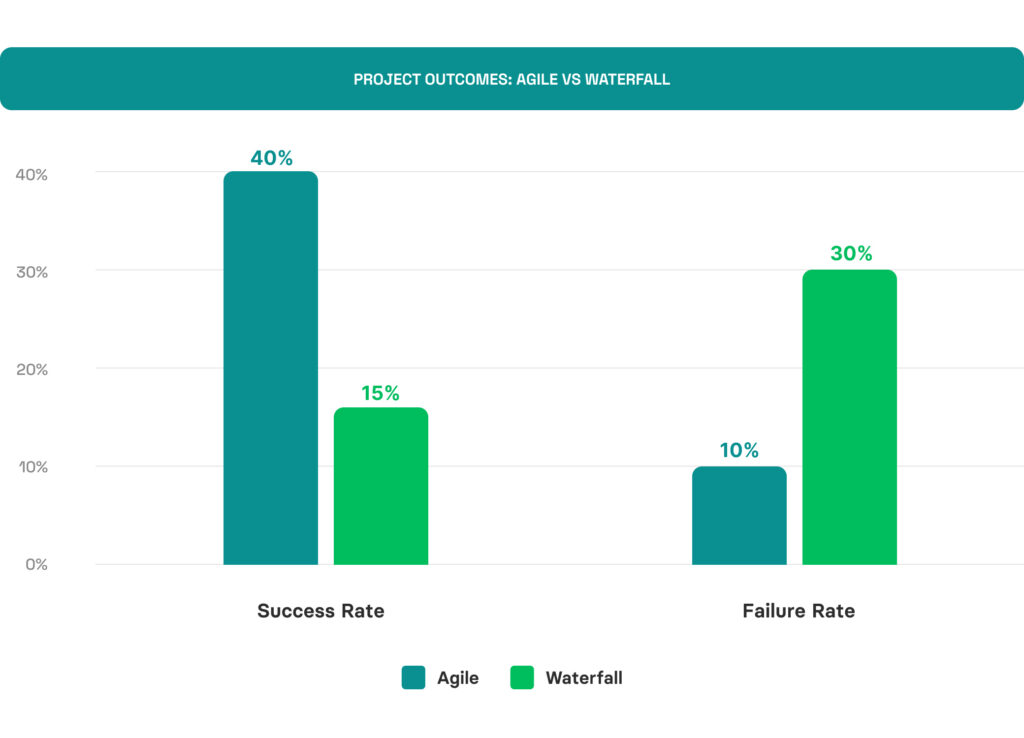
Agile. Work breaks into 1-4 week sprints. The team ships small increments, gathers feedback, and adjusts scope between sprints. Strong fit when requirements will evolve.
Waterfall. Each phase finishes fully before the next begins. Requirements are locked early. Strong fit when compliance, contracts, or fixed scope make changes expensive (medical, defense, government).
Hybrid. A locked-scope plan with Agile execution inside each phase. Used when an enterprise wants Agile delivery rhythm but a Waterfall budget structure.
| Methodology | Failure rate | Best for | Typical sprint |
|---|---|---|---|
Agile | 10% | Evolving requirements, MVPs, consumer products | 2 weeks |
Waterfall | 30% | Fixed scope, compliance-heavy, defense/medical | N/A (phase-based) |
Hybrid | No data | Enterprise IT, multi-vendor projects | 2-4 weeks inside phases |
Source: International Journal of System Assurance Engineering and Management
How is AI changing full cycle software development?
AI assistants are now part of most real-world development workflows. But the productivity gains are a lot messier than most vendor pitches make them sound.
A METR study found that developers believe AI tools help them code about 20% faster on average. At the same time, the study’s actual results paint a more complicated picture, showing that experienced developers often took 19% longer to complete tasks when using AI assistance.
A lot of that comes down to how AI is actually used. It doesn’t replace parts of the software development process – it mainly helps speed up certain workflows when used in the right places.
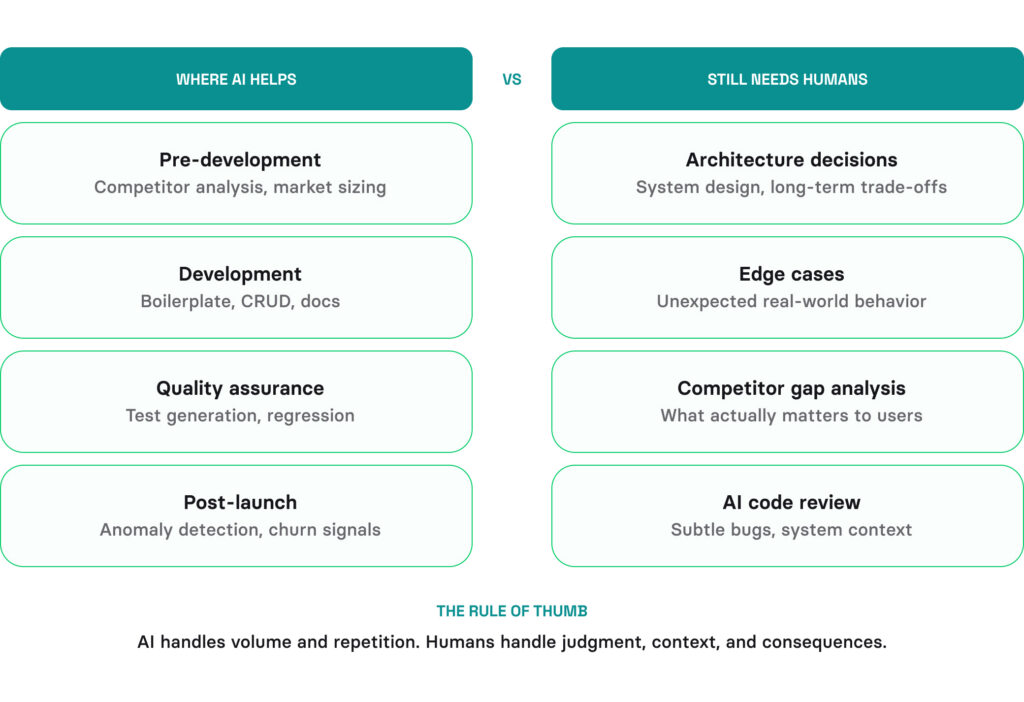
Where AI helps
From our experience, AI is a reliable helper in:
- Pre-development: Faster competitor analysis, app-store sentiment mining, market sizing across more sources.
- Development: Boilerplate, CRUD, test scaffolding, and documentation – the routine work that used to drain senior time.
- QA: Test-case generation from requirements, visual-regression detection, risk-prioritized test selection.
- Post-launch: Anomaly detection, churn prediction, sentiment analysis on reviews and tickets.
Where AI doesn’t replace humans
Things like architecture decisions, edge cases, and figuring out which gaps in a competitor’s product actually matter still come down to people. AI-generated code also needs someone who understands the system well enough to review it, catch subtle bugs, and deal with it again six months later.
AI tools sit in our sprint workflow today. They’re strongest on routine work – boilerplate, tests, repetitive patterns. Every AI-generated block goes through the same code review as human-written code. The speed gain is real on routine work; the quality bar doesn’t change.
How much does full cycle software development services cost?
The cost mostly depends on the scope of the project, the team’s location, and the tech stack you choose. The ranges below include the full software development process: discovery, design, development, QA, deployment, and early post-launch support.
| Project type | Scope | Timeline | Cost range |
|---|---|---|---|
MVP / Small project | Core features, single platform | 2-4 months | $50,000 – $150,000 |
Medium project | Multi-platform, integrations, admin panel | 4-8 months | $150,000 – $500,000 |
Enterprise system | Complex architecture, multiple integrations, compliance | 8-18 months | $500,000+ |
From my experience, the biggest cost variable is scope clarity. Discovery can feel like an extra expense at first, but it keeps the project much closer to the original estimate. Even if a team charges 20% more but does proper discovery upfront, you’ll often end up paying less than with a team that starts coding right away. Rework is almost always what gets expensive.
If you’re comparing vendors on price alone, you’re optimizing for the wrong thing. Compare scope clarity, Discovery depth, and post-launch defect rate – those three predict total cost far better than the rate card.
Full cycle development vs staff augmentation vs dedicated team
Full cycle isn’t always the right model. Your choice depends on what you already have in-house and what you need. We’ve covered the details in our expert view on software development outsourcing models, but here’s the decision framework that will help you understand when to use full cycle development.
Full cycle development. A vendor team handles everything end-to-end –from discovery all the way to post-launch. You set the direction and goals, and they take care of execution, people, and delivery. This works best for founders without a CTO or for companies replacing legacy systems, where you want one team owning the whole stack.
Staff augmentation. You bring in developers who join your existing team and work under your engineering managers. The vendor takes care of hiring, retention, and sourcing. It works best when your custom software development process is already in place, and you just need extra hands on a specific stack.
Dedicated team. A vendor assembles a long-term team of mixed roles (devs, QA, PM, designer) who work only on your project but inside the vendor’s process and infrastructure. A dedicated development team fits multi-year products where you want continuity but don’t want to scale internal hiring.
| Factor | Full cycle | Staff augmentation | Dedicated team |
|---|---|---|---|
You need | Entire product built end-to-end | Specific skills to fill gaps | Long-term capacity for ongoing work |
You have | An idea, not a team | A team, missing a specialist | A product, need sustained velocity |
Management | Vendor manages the team | You manage the person | Shared management |
Timeline | Project-based (3-12 months) | Flexible (weeks to months) | Ongoing (6+ months) |
Best for | New products, MVPs, rebuilds | Scaling existing teams fast | Product companies without in-house dev |
Risk | Vendor dependency | Integration and culture fit | Long ramp-up time |
So, when does full cycle make sense? When you don’t have an internal development team, when you’re building a new product from scratch, or when you need a complete rebuild with fresh architecture decisions. If you already have a strong team and need one more React developer, staff augmentation is the better fit.
Wrapping up
Full cycle software development isn’t a process flowchart – it’s a commitment to keeping the same team accountable from “we should build this” to the moment real users start leaving reviews. Most software doesn’t fail because the code was bad. It fails because nobody asked the right questions before the first line was written.
What still holds up in 2026 is pretty simple: don’t build blind, don’t overbuild, and don’t ignore what users are telling you through their actions. The products that stay relevant for years are the ones where teams start with validation, keep the scope flexible enough to change direction, and stay close to real users. For these teams, project discovery isn’t just another phase – it’s the easiest way to avoid expensive mistakes. And post-launch isn’t an afterthought either; it’s built into the plan from day one.
Everything else in this guide is just there to support those habits and make them work in practice.
Questions & Answers
FAQ
What’s a realistic post-launch budget compared to the build cost?
Plan for the post-launch support software development lifecycle phase at about 15–25% of the original build cost per year for the first two years. Below 15% and you’re likely under-investing in iteration. Above 25%, and you’re probably covering rework that good discovery and QA should have caught earlier.
How do you protect IP and source code when handing it to a vendor?
Three layers. First, every full-cycle developer signs an NDA at the start. Second, IP rights are tied to each deliverable in the SOW. Third, the code lives in the client’s repos, not the vendor’s. If you’re under GDPR or HIPAA, add a data residency clause too. And check access logs every quarter.
How do you avoid vendor lock-in on architecture choices?
Avoid proprietary frameworks unless there’s a strong reason for them. Stick to standard CI/CD tools, infrastructure-as-code like Terraform, and proper architecture decision records.
Do a 2-day “transition rehearsal” halfway through – get another engineer to try onboarding the codebase. That’s usually where vendor lock-in shows up.
When to use full cycle development for a product that’s already in production?
Full-cycle development makes sense for an existing product in three cases: the codebase is spread across vendors with no clear owner, the product has outgrown the original team and needs stabilizing, or you’re pivoting and need discovery again.
If you just need more capacity, staff augmentation is usually the better fit.
Why do software development projects fail?
Software projects rarely fail because of bad code. They fail because the wrong thing gets built, or the right thing comes too late. Most of the time, it comes down to the same issues: untested requirements, lost context between handoffs, and no plan for what happens after launch.
Offshore, nearshore, or onshore – how do you pick?
Choose based on overlap, not hourly rates. If you’ve got less than four hours of shared working time, async starts to break down on complex products. Nearshore fits active builds best, offshore works for steady maintenance and 24/7 coverage, and onshore makes sense for regulated work where access or clearance matters.