

- Kotlin Multiplatform has already established itself as a strong cross-platform development framework. It can speed up development and reduce project costs by around 30–45% compared to fully native approaches and can reuse over 60% of the codebase (over 90% if UI is built with Compose Multiplatform).
- Flutter is a heavyweight in the cross-platform mobile development space. It uses a single shared codebase for all platforms, enabling around 80–90% code reuse. It can often get projects off the ground 2–3 times faster than KMP, at least for now.
- The choice of the right framework for your cross-platform development project depends on many factors, such as time to market, budget, reliance on platform-specific features, and how you want your app’s UI to feel.
Cross-platform is a go-to option for businesses that want to deliver mobile products on iOS, Android, and other platforms without maintaining separate codebases. No wonder that the global market for cross-platform app development is expected to reach $198.96 billion in 2030, according to the report from GII Research.
Quite often, this approach translates into faster product releases, reduced development costs, and simplified long-term maintenance. For example, the global survey from Research 2 Guidance states that cross-platform app development can reduce development time by 30%.
To get the most out of these benefits, it’s important to make a smart call and pick the cross-platform framework that best fits your needs. From my experience at Volpis, two of the dominant technologies in this domain are Flutter and Kotlin Multiplatform (KMP). Both are widely adopted and supported by strong developer communities, which is highlighted by the Stack Overflow Developer Survey.
Today, I’ll share real project experience comparing Kotlin Multiplatform and Flutter in terms of architecture, performance, and practical use cases. The goal is to help you choose the right approach for your product and team.
What is Kotlin Multiplatform?
Kotlin Multiplatform is a cross-platform app development framework first introduced by JetBrains in 2017. It reached a stable, production-ready status in November 2023 with the release of Kotlin 1.9.20. The framework allows users to write shared business logic with Kotlin, while KMP compiles it to native code for Android, iOS, desktop, web, and server. This involves parts like networking, database access, validation, and state management. In some cases, like Forbes, as described in their official case study, KMP can share over 80% of app business logic across Android, iOS, and web.
In May 2024, Google officially endorsed KMP for sharing business logic across platforms. Google Docs itself uses KMP to share code across Android, iOS, and the web.
As for UI development, there are currently two different approaches. If you choose a native way, your iOS app still uses SwiftUI or UIKit, while your Android app still uses Jetpack Compose. But, since the release of the Compose Multiplatform framework, which serves as a UI layer within the KMP ecosystem, developers can create shared cross-platform UI in Kotlin Multiplatform projects. Worth mentioning that Compose Multiplatform still lacks maturity, particularly for iOS and web development, but the framework is rapidly evolving.
However, Kotlin Multiplatform was once also regarded as an immature technology. But over the past few years, I’ve seen the framework evolve significantly, and I now consider it a solid option for cross-platform development. We have recently covered this question in the article that explores Kotlin Multiplatform’s production readiness.
Another KMP benefit is that the framework relies on a vast Kotlin ecosystem and a large and growing talent pool. For example, a recent article on Kotlin development from JetBrains reveals that this programming language already has 2.5 million developers worldwide
What is Flutter?
Flutter is Google’s open-source UI framework. It uses the Dart language and its own rendering engine (Skia/Impeller) to draw every pixel on screen. Flutter is already an established and mature cross-platform development technology powering over 1 million apps on the Google Play Store, according to Flutter’s official blog. It also has over 176,000 appraisals on GitHub, which highlights the framework’s massive popularity among the developer community.
Unlike Kotlin Multiplatform, Flutter replaces native components entirely. The framework renders its own widgets. Typically, a Flutter-based app looks identical on iOS and Android. This makes software more consistent and increases development speed. Flutter also provides libraries of native-like widgets (such as Cupertino for iOS) for projects that require platform-specific UI.
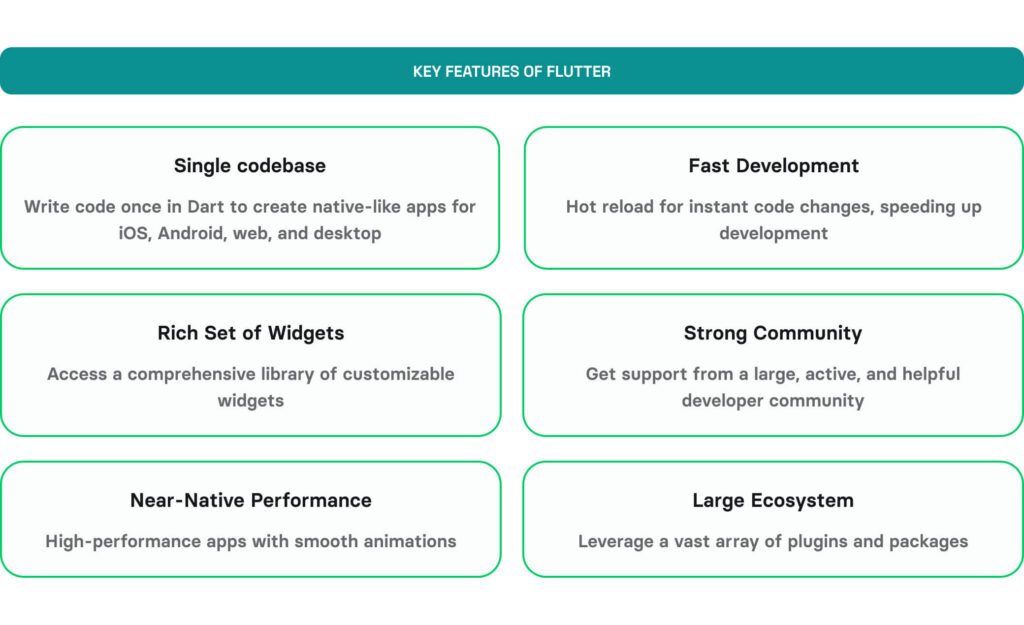
The framework still leaves space for implementing native features, as developers can reach the capabilities of specific operating systems via platform channels. But this approach comes with limitations and can add some extra overhead.
In most Flutter projects, developers focus on sharing a single codebase across different platforms. For startups and MVPs, it’s one of the fastest paths from idea to app store. For more specific insights, check out our Flutter for startups guide.
KMP vs. Flutter: Key differences
With my experience working with both KMP and Flutter, I understand that there is no definitive answer to which technology is better. Each can be an ideal fit depending on the project’s requirements. While both frameworks focus on reducing code duplication across platforms, they take opposite paths to get there.
KMP vs. Flutter: Head-to-head comparison
The table below summarizes the Kotlin Multiplatform vs. Flutter comparison by the most critical parameters.
| Dimension | Kotlin Multiplatform | Flutter |
|---|---|---|
Created by | JetBrains | |
Language | Kotlin | Dart |
What’s shared | Business logic (networking, data, validation) is shared. Two approaches to building UI:
| Everything: UI + logic + navigation |
UI approach | Native (SwiftUI/UIKit on iOS, Jetpack Compose on Android) or custom rendering with Skia if you use Compose Multiplatform | Custom rendering engine (Skia/Impeller) |
Code reuse | Typically, 40-60% (shared logic only), possibly over 90% with Compose Multiplatform | Over 80-90% (single codebase) across all the major platforms |
Performance | Near-native (compiles to native code) | Near-native (compiled AOT, custom renderer) |
App size overhead | Minimal (shared logic is a library) | +5-10 MB (Flutter engine) |
Hot reload | Yes (CMP 1.10.0+, bundled) | Yes (sub-second, stateful) |
Platform feel | Fully native on each platform | Consistent across platforms (custom widgets) |
Platform API access | Typically, direct | Via platform channels (bridge) |
Package maturity | Growing (Maven Central + native package managers) | Mature (pub.dev, 40,000+ packages) |
Gradual adoption | Yes: add to existing native apps incrementally | Requires full rewrite or embed as module |
The chart below helps you visualize how both KMP and Flutter perform across the most critical areas.
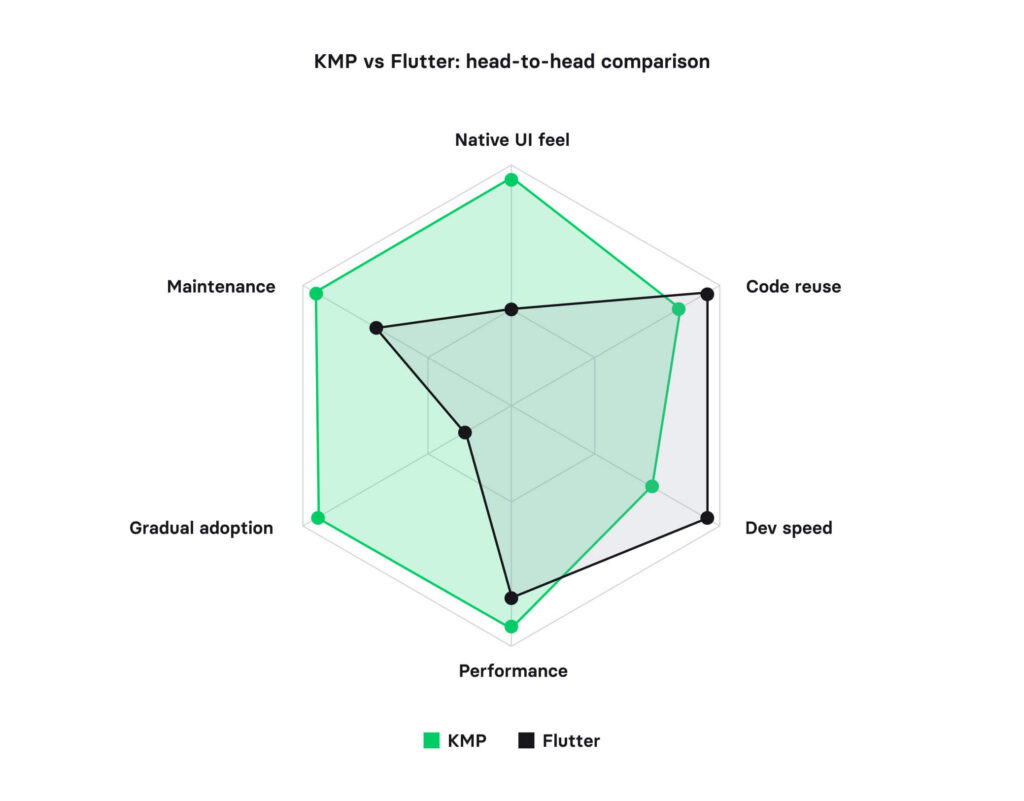
There are certain aspects where the distinctions between the frameworks matter the most. One of such vital parameters is the framework’s ability to handle device-specific APIs.
How do KMP and Flutter handle device-specific APIs?
This is where the architectural difference between the two frameworks hits hardest.
While using KMP, developers can define a common interface in shared code and write native implementations in Swift for iOS and Kotlin for Android. As a result, KMP uses platform-specific code to call native APIs directly. This approach minimizes bridging overhead, which may still be required in certain cases.
Meanwhile, Flutter accesses the same APIs through platform channels and community plugins. For common features, such as GPS and camera, Flutter plugins are mature and reliable. For newer ones, such as ARKit updates, the plugin ecosystem often lags 3 to 12 months behind native releases. Also, such a reliance on platform channels and plugins creates an additional layer between your code and the operating system. This added complexity increases CPU usage and can make the architecture more difficult to maintain.
The cross-platform mobile development framework comparison table below summarizes how both frameworks interact with the most common platform-specific APIs.
| Device API | KMP Approach | Flutter Approach | Key Difference |
|---|---|---|---|
AR (ARKit / ARCore) | Direct native ARKit/ARCore calls from Swift/Kotlin | arkit_plugin, ar_flutter_plugin (community) | Flutter AR plugins lag behind native ARKit updates. KMP gets day-one access |
GPS / Location | Direct CoreLocation (iOS), FusedLocationProvider (Android) | geolocator plugin (mature, well-maintained) | Both work well. Flutter’s geolocator is one of its strongest plugins |
Bluetooth | Direct CoreBluetooth / Android Bluetooth API, or Blue Falcon (KMP library) | flutter_blue_plus (BLE only, no Bluetooth Classic) | Flutter cannot access Bluetooth Classic. KMP handles both BLE and Classic natively |
Camera | Direct AVFoundation (iOS), CameraX (Android), or CameraK (KMP library) | camera plugin (official, Google-maintained) | Flutter’s camera plugin is solid for basic use. Advanced features need platform channels. |
Sensors (Gyroscope, Accelerometer) | Direct CoreMotion (iOS), SensorManager (Android) | sensors_plus plugin (community) | Similar capability. KMP offers finer control over sampling rates and raw data |
HealthKit / Health Connect | Direct HealthKit (iOS), Health Connect (Android), or HealthKMP library | health plugin (community) | Both cover read/write. KMP gets immediate access to new HealthKit data types |
NFC | Direct Core NFC (iOS), NfcAdapter (Android) | nfc_manager plugin (community) | Flutter’s plugin covers basic NDEF. KMP accesses the full NFC API surface |
Push Notifications | Native APNs/FCM, or KMPNotifier (shared wrapper) | firebase_messaging plugin (official) | Both work. Flutter is tightly coupled to Firebase. KMP can use any push provider |
On-Device ML (Core ML / ML Kit) | Direct Core ML (iOS), ML Kit (Android) from native code | google_mlkit plugins, tflite_flutter | Flutter uses TensorFlow Lite or ML Kit wrappers. No direct Core ML access |
In-App Purchases | Direct StoreKit 2 (iOS), Google Play Billing (Android) | in_app_purchase plugin (official, Google-maintained) | Flutter’s plugin is mature. KMP gets StoreKit 2 features on release day. |
Biometrics (Face ID, Fingerprint) | Direct LocalAuthentication (iOS), BiometricPrompt (Android) | local_auth plugin (official) | Both cover standard biometrics. KMP allows custom authentication flows |
Purple ConneX needed OS-level Wi-Fi scanning, background location for hotspot notifications, and offline maps with millions of data points. The problem is that Wi-Fi connection APIs differ completely between iOS (NEHotspotConfiguration) and Android (WifiManager), and there is no Flutter plugin to cover both reliably. We used KMP to write platform-specific Wi-Fi handlers in Swift and Kotlin while sharing the hotspot database, filtering logic, and user contribution system across both platforms.
For more information, check out our Purple ConneX case study.
Bottom line: Products that depend on hardware, such as IoT apps or solutions with AR integrations, hit Flutter’s plugin ceiling faster. But in my experience, you probably won’t notice much of a difference when building an app that mainly relies on networking, storage, and standard UI.
Which framework delivers better performance?
Both frameworks actually deliver strong performance for most apps across different devices. Still, there are some differences in startup time, rendering approach, and platform API latency.
| Metric | KMP | Flutter |
|---|---|---|
Startup time | Native speed (no engine load) | +100-300ms engine initialization |
App size overhead | +1-2 MB (shared module) | +5-10 MB (Flutter engine + runtime) |
Platform API latency | Zero in most cases (direct native calls) | Bridge serialization per call |
Animation / UI | 60fps native components | 60fps via the Flutter Impeller engine |
iOS memory management | ARC, no GC pauses | Dart VM, higher baseline (~10-30 MB) |
One of the key KMP benefits in terms of app performance is that the framework compiles to native binaries on each platform. This makes KMP a strong choice for apps that interact heavily with native platform capabilities. The tradeoff is that performance optimization often means working on both platform-specific parts.
Flutter compiles Dart to native ARM code through AOT compilation. The framework is well-optimized and uses a powerful rendering engine, Impeller, to deliver smooth 60fps on modern devices. Also, some platform-specific behaviors or advanced integrations may need additional optimization or custom native code.
For most platforms, the performance gap is negligible. Differences start to appear when it comes to software with deep platform integration. All because of Flutter’s heavier reliance on the bridging layer.
Bottom line: If your app is mostly screens, forms, and API calls, both frameworks perform equally well. If your software relies on hardware sensors, real-time data, or GPU-intensive rendering, KMP’s native is a more reliable and predictable path.
Kotlin Multiplatform vs. Flutter: Architecture differences
KMP takes a layered approach, separating the application architecture into shared and platform-specific concerns. Core business logic is written once in Kotlin and shared across platforms, while the platform integrations are typically built using native technologies. The same principle typically applies to UI, but the number of KMP projects with shared user interfaces tends to grow with the growing adoption of Compose Multiplatform. The key benefit is near-native app performance across different platforms. Still, development effort and cost can grow as you decide to develop some native features separately for different platforms.
Flutter operates on a single shared codebase model. Features, fixes, and UI updates are implemented once and deployed across all platforms, with some minor exceptions. Overall, Flutter enables developers to reuse over 80-90% of the codebase across different platforms. The remaining cases refer to platform-specific features that require native code. For example, accessing iOS App Groups when building Apple-specific widgets within an iOS app. The tradeoff is that the mobile architecture becomes tightly coupled to the Flutter framework and its ecosystem. This can influence technology choices and integration patterns in the long run.
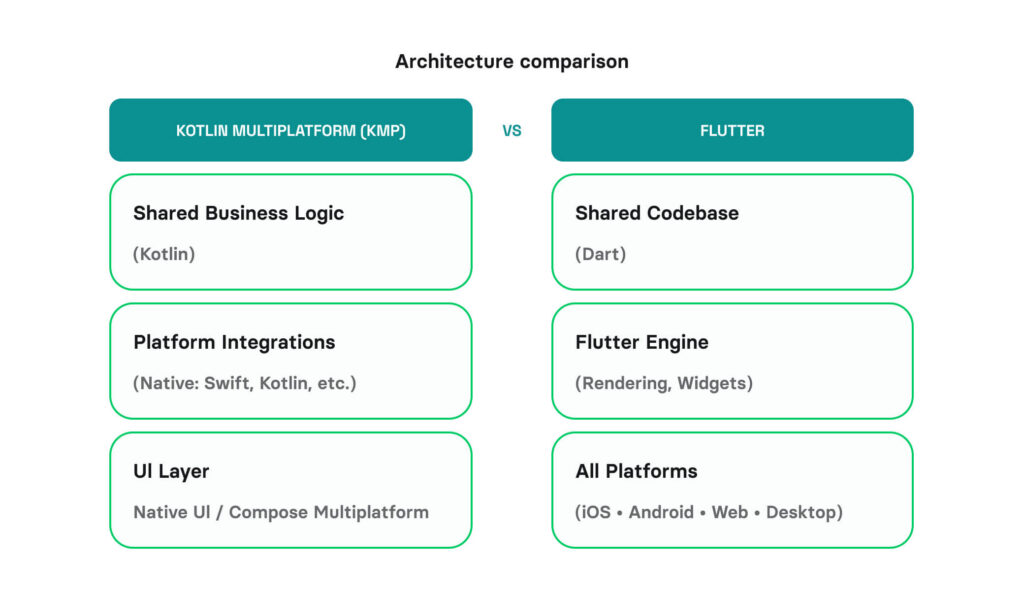
Bottom line: With its unified codebase, Flutter is often a stronger fit for new products that should be delivered fast. Meanwhile, KMP is a better choice for larger projects where the goal is building a complex, performance-sensitive application.
Kotlin Multiplatform vs. Flutter: Development cost
By sharing business logic across platforms, which typically accounts for 40-60% of the entire app codebase, KMP helps teams reduce upfront investment. As for UI development, KMP supports both shared (Compose Multiplatform) and platform-specific approaches. To build platform-specific features and some UI components, teams typically need 2–3 developers with expertise in Kotlin and Swift. KMP also introduces infrastructure overhead, as build systems require configuring both Gradle and Xcode toolchains, along with CI/CD pipelines. That said, KMP’s architecture pays dividends over time. When Apple or Google ships a new API, in most cases, native UI code can be introduced to use it directly.
In Flutter-based projects, upfront investment tends to be even lower. A single Dart codebase covers over 80-90% of the application, meaning fewer duplicated tasks across platforms and smaller teams (typically 1-2 developers) for shipping an app to both iOS and Android simultaneously. However, long-term costs can climb. Each major platform OS release tends to break 15-25% of popular plugins. On apps with 8-12 native integrations, teams typically spend 3-6 weeks per year on compatibility patches.
The crossover point: For apps with fewer than 4-5 native system API integrations, Flutter’s total cost of ownership over two years tends to run 10-20% lower than KMP. Above that threshold, KMP’s direct native access closes and ultimately reverses the gap.
The bottom line: Flutter wins on initial cost and team simplicity; KMP wins on long-term maintainability and native platform alignment. The right choice depends less on which framework is cheaper in year one, and more on how deeply your product needs to integrate with platform APIs over time.
From my experience, the cost of an average KMP or Flutter project depends on the factors summarized in the table below.
| Cost Factor | KMP | Flutter |
|---|---|---|
Initial development | Moderate — shared logic saves 30–45%, but UI is separate | Lowest — one codebase covers both platforms |
Team size | 2–3 devs (Kotlin + Swift/Kotlin UI) | 1–2 devs (Dart only) |
Maintenance (yearly) | Low — native UI updates automatically | Medium — plugin updates, framework upgrades |
Migration risk | Low — add/remove modules incrementally | High — all-or-nothing rewrite |
KMP vs. Flutter: Time to market
KMP allows teams to accelerate development speed by 30-45% compared to native development projects. Software engineers can reuse core modules, such as networking, data synchronization, and domain logic. Where KMP may give back some of that speed is in the UI layer. Compose Multiplatform provides features for developing a shared UI, but it still has some limitations for iOS and web. Platform-specific features are typically implemented separately for each platform, which requires tight coordination between iOS and Android development workstreams.
Flutter is purpose-built for speed of delivery. Your developers implement most of the features, fixes, and UI updates once and deploy them across all platforms simultaneously. From our experience, infrastructure and CI/CD pipeline configuration in Flutter projects can be 2-3 times faster than in ones based on KMP. This makes Flutter a very popular option for building cross-platform MPVs. Still, such development speed comes with some tradeoffs. The team must fully adopt Flutter’s ecosystem and development model. Some platform-specific features may also require additional integration work that erodes some of that speed advantage.

“Flutter has an unmatched developer UI that is focused on building cross-platform software fast. In certain cases, a skilled developer can deliver a simple, working cross-platform app within hours.”
– Serhii Bohachenko, Flutter Developer at Volpis
Bottom line: Flutter is generally faster to build with than KMP, which makes it a great choice for quick MVPs. Kotlin Multiplatform comes with a bit more coordination overhead, but it still holds up well in terms of speed and is a better fit for projects that need a stronger native focus.
Shared UI: Does Compose Multiplatform change the game?
One of the main arguments against KMP has been the need to build UI twice. To address this, JetBrains released Compose Multiplatform 1.8.0, a UI layer of the KMP ecosystem allowing teams to share UI across Android, iOS, desktop, and web. In some cases, this allows for 90%+ code reuse, comparable to Flutter. Compose Multiplatform integrates well with SwiftUI and UIKit, so developers can still use native UI where needed. However, it remains an evolving technology. Compose Multiplatform’s custom rendering layer introduces some limitations and does not automatically adopt new iOS UI updates. As a result, certain innovations, such as the Liquid Glass design UI logic, may not be supported immediately. Additionally, as of March 2026, the framework’s capabilities for developing web UI are still very limited.
With Compose Multiplatform, KMP offers features for building shared UI, and the framework is rapidly evolving. However, it remains less mature than Flutter and lacks equivalents to some of Flutter’s more polished native-like components, such as the Cupertino library for iOS. At the same time, KMP is designed to let developers combine a shared codebase with native implementations.
Flutter creates a shared UI for all platforms based on widgets. The framework also provides a large ecosystem of tools and workarounds for building native-like features for iOS, Android, web, and desktop through platform channels. This may create additional overhead and increase memory usage. Meanwhile, Flutter’s UI ecosystem is more mature and involves more components and tools for native-like UI development than Compose Multiplatform. For example, the latter still has no equivalent to Cupertino widgets, Flutter’s mature library of custom-drawn widgets that deliberately replicate native iOS components.
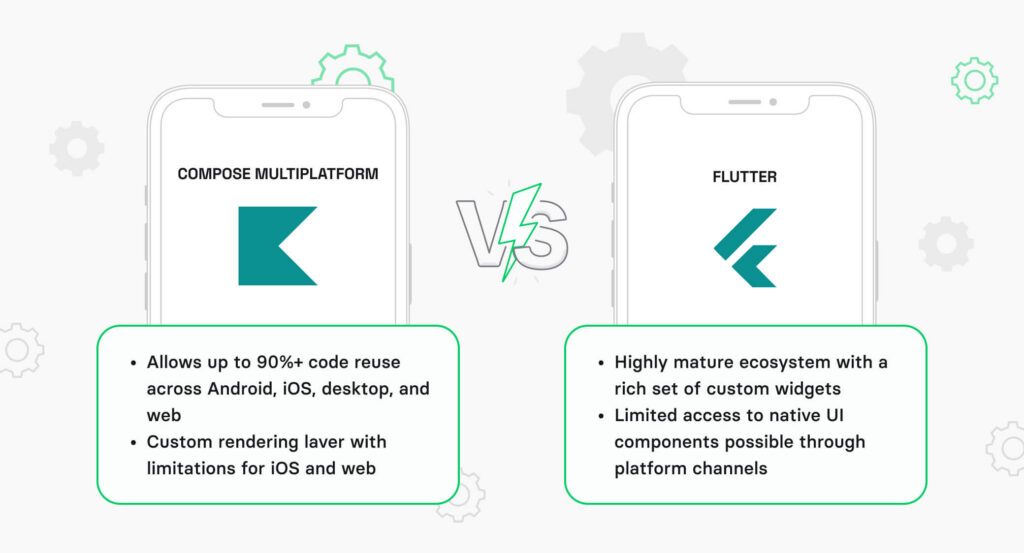
The bottom line: Both KMP and Flutter provide tools for developing shared UI across platforms. However, Flutter’s ecosystem is more mature and flexible when it comes to building shared UIs. However, KMP aims to keep up with its Compose Multiplatform UI framework.
Who uses KMP and Flutter in production?
To better understand when KMP and Flutter make the most sense, it is useful to look at how they’re applied in real-world products. The table below shows some well-known cross-platform apps built with Kotlin Multiplatform and Flutter.
| Company | Framework | What they built |
|---|---|---|
Duolingo | KMP | Video Call, Math, Adventures features across Android, iOS, and web (40M+ daily users) |
Google Workspace | KMP | Shared business logic across Google’s productivity apps |
McDonald’s | KMP | Cross-platform navigation on Android and iOS |
Netflix | KMP | Shared business logic for mobile apps |
X (formerly Twitter) | KMP | Core feature rebuilt across three platforms with a small team |
Google Ads | Flutter | Full campaign management app for Android and iOS |
BMW | Flutter | My BMW app with digital key and remote services |
Alibaba | Flutter | Xianyu marketplace app with 50M+ monthly users |
When should you pick KMP, Flutter, or go native?
Your starting point and product requirements decide this. There’s no universal winner. The framework below helps you pick the right option between KMP and Flutter. I’ve also included a native approach here because, in certain cases, it proves to be a better fit than cross-platform software development.
| Scenario | KMP | Flutter | Native (Swift + Kotlin) |
|---|---|---|---|
Existing native Android or iOS app | Yes: add KMP module incrementally | Requires full rewrite | Yes: Create a native iOS/Android app (depending on your budget or time constraints) |
Greenfield MVP, tight budget | Possible, but more setup | Yes: single codebase, fastest path | Most expensive option |
Platform-specific UI/UX required | Yes: native UI per platform | Limited: custom widgets only | Full control |
Shared UI/UX required | Yes: Compose Multiplatform (as for now, still less mature than Flutter’s ecosystem) | Yes: Material + Cupertino widget libraries | No: separate UI codebases |
Heavy device API use (AR, BLE, sensors) | Yes: direct native API access | Via plugins (3-12 mo lag) | Direct access |
Pixel-identical UI on both platforms | Possible with Compose MP | Yes: One of Flutter’s core strengths | No: different per platform |
Web + desktop targets | CMP (web beta, desktop stable) | Stable on all platforms | Separate codebases needed |
Enterprise compliance | Native security APIs direct | Extra bridging required | Full control |
Long-term maintenance (3+ years)
| Low: native UI + shared logic | Plugin dependency risk | Lowest: no framework layer |
The practical rule: If more than 50% of your app is genuinely shareable business logic (networking, data, validation), KMP pays for its setup cost. Below that threshold, the shared module overhead doesn’t earn back its maintenance cost. If your app is mostly UI with minimal shared logic, Flutter or native is a better option.
Don’t forget about the hiring factor. Kotlin developers can contribute to KMP projects right away. Flutter requires Dart expertise, which is a smaller talent pool.
Final thoughts
There’s no one-size-fits-all answer when it comes to the Flutter vs. Kotlin Multiplatform debate. It all depends on what you’re trying to build. Flutter is more mature right now, with a bigger ecosystem, faster development cycles, and strong code reuse. However, KMP is catching up quickly. For instance, Compose Multiplatform is here to bring Flutter-like UI sharing to KMP projects.
For now, the decision is pretty straightforward. If you want to move fast and keep costs down, Flutter is a great choice. If you are more focused on deep platform integration and a native feel, KMP makes more sense (or fully native if you want to push that even further).
In either case, we are ready to help. Discuss with us your project needs, and we’ll help you choose the right approach, team setup, and timeline.
Hire Flutter Developers to ship cross-platform apps fast without sacrificing quality.
Hire Kotlin Multiplatform Developers to build native-like cross-platform software for iOS and Android.
Questions & Answers
FAQ
Can we run KMP and Flutter side by side in the same app?
Technically, yes because both support embedding as modules. However, this approach can feel too heavy. You need to deal with the overhead of two frameworks, two ecosystems, and two maintenance burdens.
Does Flutter’s 5–10 MB engine overhead actually matter for users?
For most markets, no. This factor can make the difference in emerging markets where users manage storage tightly or have low-end devices, this overhead can affect install conversion.
What’s the realistic timeline to switch from Flutter to KMP (or vice versa) if we change our minds?
In such a case, you will need a full rewrite. For a mid-sized app (10-20 screens, 5+ integrations) it will take 4-9 months to rebuild. Overall, we strongly recommend planning everything thoroughly in advance in order not to pay twice.
When is Flutter an optimal choice for my cross-platform development project?
If you want to deliver an app across multiple platforms as fast as possible or need a consistent, Pixel-identical UI with high customization possibilities, Flutter is an optimal choice.
When is KMP an optimal choice for cross-platform development?
Choose KMP if you want to compare the benefits of a shared codebase while leaving space for native integrations, platform-specific features, and native UI patterns. KMP is also an efficient choice in case you have an existing Android or iOS app.