
- Based on our experience across several KMP projects, this framework can reduce iOS and Android development cost and timeline by 30–45% compared to fully native apps, especially when most business logic is shared, and the native iOS layer stays under 50%. In practice, savings can be lower due to added complexity, such as multiple IDEs, CI/CD rebuilds, and Gradle build times.
- Whether it’s the right fit for your app depends on your platform roadmap, how much you rely on native Apple hardware APIs, your timeline, the size of the app, and your UI requirements. This guide walks through all five and provides a decision framework at the end.
Swift and Kotlin are the most popular mobile development frameworks according to the Stack Overflow developer survey. While Swift gives you a full toolset for iOS development, Kotlin covers Android and extends its capabilities to cross-platform app development with the Kotlin Multiplatform (KMP) framework.
If you are planning to build an app that runs on Android and iOS, both KMP and Swift are reasonable options for iOS development on paper. But each approach comes with specific benefits and trade-offs. The wrong choice doesn’t just slow you down — it can lock your mobile app architecture into decisions that are costly to reverse.
In this guide, we want to show where each approach performs well in production and where it falls short. We cover critical parameters, such as app performance, development speed, cost, hiring, debugging, and App Store compliance. This overview is based on patterns we’ve seen across mobile apps built on both architectures.
What is KMP, and what is Swift?
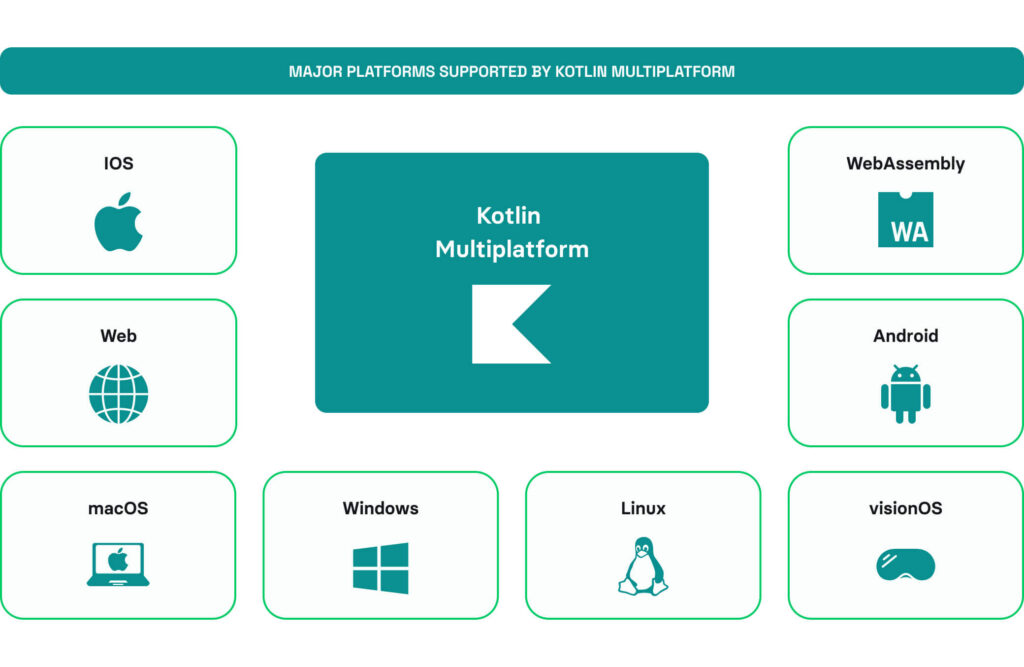
Kotlin Multiplatform (KMP) is a JetBrains framework that allows teams to write shared business logic in Kotlin and compile it for iOS, Android, web, and desktop from a single codebase. On iOS, shared Kotlin code compiles to a native Objective-C framework via Kotlin/Native, without any JavaScript bridge or virtual machine. As a result, your iOS app calls it like any other framework.
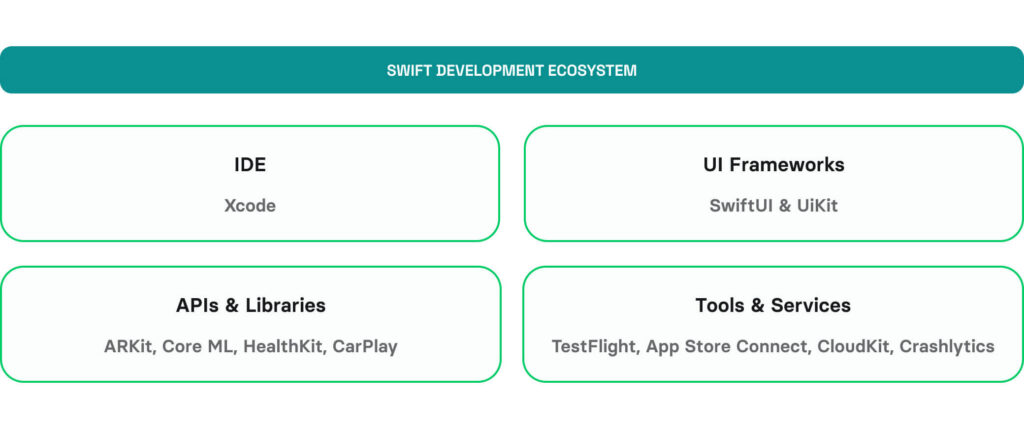
Swift is the successor to Objective-C as Apple’s primary language for iOS, macOS, watchOS, tvOS, and visionOS. iOS engineers use it for efficient and straightforward mobile app development thanks to Swift’s direct access to the full Apple SDK, including UIKit, SwiftUI, ARKit, RealityKit, CoreML, HealthKit, and Apple’s native hardware APIs.
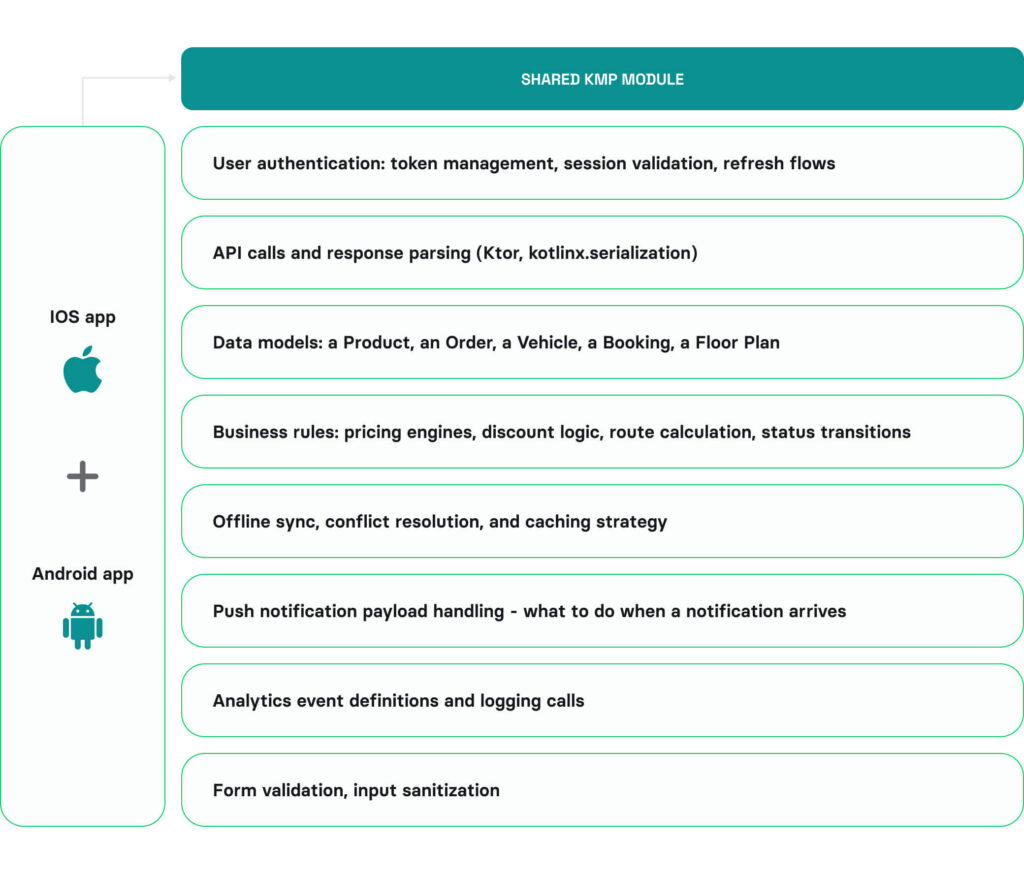
Both technologies actually work together very well in production apps. KMP owns the shared layer, while Swift is responsible for the iOS UI and Apple’s hardware APIs. The critical question here is: how much of your iOS codebase can actually move into that shared layer? The answer depends on what your app does.
How can KMP share business logic?
KMP can share apps’ business logic across iOS, Android, and beyond.
Business logic is the code that makes your app work, independent of any screen or device. It’s the rules engine. The data layer. The integration with your backend. A practical question that helps you identify your app’s business logic: could this code run on a backend server without changing anything? If yes, it’s business logic.
These are parts of business logic that KMP typically shares across platforms:
- User authentication: token management, session validation, refresh flows
- API calls and response parsing (Ktor, kotlinx.serialization)
- Data models: a Product, an Order, a Vehicle, a Booking, a Floor Plan
- Business rules: pricing engines, discount logic, route calculation, status transitions
- Offline sync, conflict resolution, and caching strategy
- Push notification payload handling – what to do when a notification arrives
- Analytics event definitions and logging calls
- Form validation, input sanitization
The percentage of shared logic varies across apps depending on their purpose. For instance, according to case studies published on Kotlin’s website, the Forbes mobile app shares around 80% of business logic across iOS and Android with KMP. Bitkey shares 95% of its mobile codebase with Kotlin Multiplatform, ensuring consistency in its open-source Bitcoin wallet. Other notable companies using KMP to share a large portion of logic across mobile platforms include Bolt, Duolingo, and McDonald’s.
Meanwhile, if an app relies heavily on device-specific features, such as camera capabilities, AR, or intensive GPS usage, the share of reusable logic drops significantly. For example, in a room-scanning app built on LiDAR, shared logic may account for less than 25%.
This ratio ultimately affects your choice between KMP and Swift.
From our experience, KMP pays off in large-scale applications where more than 50% of your iOS code is business logic that can be shared between Android and iOS. Below that threshold, the shared module overhead doesn’t earn back its setup and maintenance cost. You’d spend more time configuring and managing bridging layers in KMP than you save on duplicated code.
How KMP accelerates development in dual-platform projects
You’ve probably seen the headline stating that “development for different platforms is 30-45% faster with KMP.” That’s real. But it doesn’t apply to the entire project — only to its business logic.
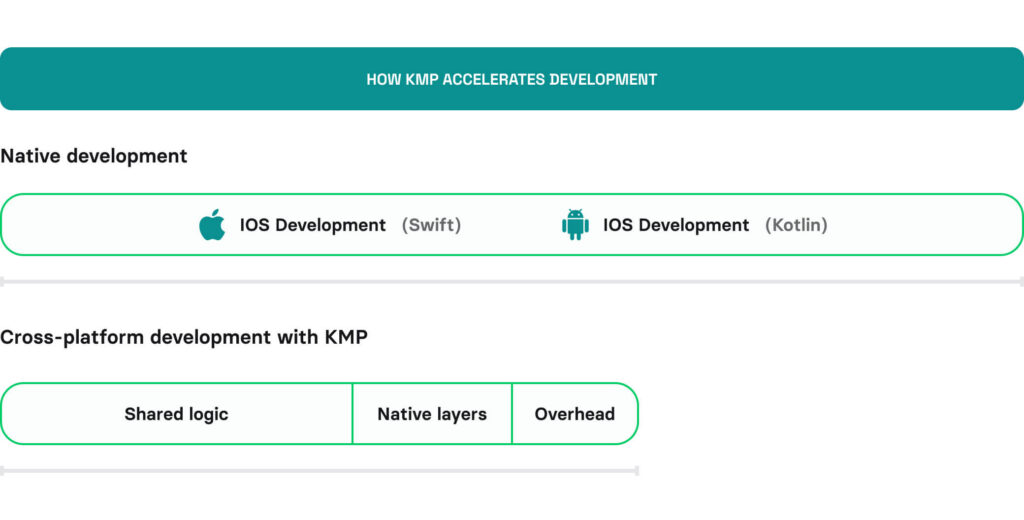
- From our experience, shared business logic typically covers 40–60% of the iOS scope, with the rest going to UI, hardware APIs, testing, App Store submission, CI/CD, and native features.
- KMP saves about 50% of the time on the shared layer.
- The added overhead of accessing native iOS features and writing Swift code (setup, Gradle builds, dual IDEs, CI/CD) can extend timelines by 2–4 weeks.
There are different methods to write native Swift code in a KMP project. One such approach — connecting to Xcode, the native Swift IDE, and writing Swift code there.
What iOS features always need native Swift?
Every KMP app needs Swift code to access specific iOS properties, whether it goes about UI components or device features. Some apps need 10% native Swift — a thin UI layer over shared logic. Others need 60% — complex hardware pipelines that can’t be bridged. The table below highlights iOS features that require native Swift, along with whether and how they can be implemented using KMP.
| iOS Feature | Can KMP Share Anything? | Native Swift Required | Community Wrapper |
|---|---|---|---|
ARKit / RealityKit | None – Swift-only API | 100% | None available |
RoomPlan / LiDAR | Data models only | 100% | None available |
Liquid Glass / iOS 19 UI | None – SwiftUI-only | 100% | None on roadmap |
WidgetKit / Live Activities | Data layer only | 100% of UI | kmp-live-activity (partial) |
visionOS / Vision Pro | None | 100% | Not on roadmap |
CarPlay | None | 100% | Not on roadmap |
Core ML / on-device AI | Processing logic only | ~75% | No CoreML wrapper; use ONNX instead |
HealthKit | Data models | ~70% | HealthKMP, KHealth |
AVFoundation / Camera | Config and result logic | ~65% | CameraK, Peekaboo |
CoreMotion / Sensors | Data processing after capture | ~60% | expect/actual pattern |
CoreLocation / GPS | Coordinate math, geofencing rules | ~50% | expect/actual pattern |
Push Notifications | Payload handling logic | ~50% | KMPNotifier, Alarmee |
StoreKit / In-App Purchases | Paywall and pricing logic | ~50% | RevenueCat KMP (covers 90%+ of standard flows) |
Core Bluetooth / NFC | Data parsing | ~40% | Blue Falcon; NFC often kept native |
Swift vs. Kotlin Multiplatform for iOS: Comparison across key areas
The table below summarizes the key differences between Swift and Kotlin Multiplatform across areas that directly impact development speed, app performance, and long-term value.
| Factor | Swift | Kotlin Multiplatform (KMP) |
|---|---|---|
App execution speed | Fully native execution with no abstraction or bridging layers. Predictable performance aligned with iOS platform expectations. | Business logic runs close to native performance. Interoperability layers may introduce minor overhead depending on the architecture. |
Memory and CPU usage | Uses ARC (Automatic Reference Counting), which provides predictable memory management without garbage collection pauses. | May introduce higher memory and CPU overhead in some scenarios. Recent Kotlin improvements have reduced this impact. |
Build times | Single toolchain (Xcode) with fast and predictable incremental builds. | Multi-toolchain setup (Gradle + Kotlin/Native + Xcode). Build performance depends on configuration, caching, and project complexity. |
Time to first release | Minimal setup required. Teams can start delivering features immediately. | Requires initial cross-platform setup (Gradle, integration, CI/CD). The first delivery timeline depends on the team’s experience and setup complexity. |
Dual-platform delivery | Separate codebases for each platform with native development teams working independently. | Shared business logic across platforms, which reduces duplication and helps maintain consistency between iOS and Android. |
iOS UI access | Full access to SwiftUI and UIKit. Immediate support for new iOS UI patterns and updates. | iOS UI is typically implemented natively with SwiftUI or UIKit. Shared UI is possible with Compose UI, but this framework is still evolving and not always used in production. |
Debugging | Single environment (Xcode) with a unified debugging workflow. | Cross-environment debugging (Gradle + Xcode). Issues may originate from shared or platform-specific layers. |
Code duplication | Higher duplication of business logic across platforms. | Shared modules reduce duplication and centralize business logic. |
Bug blast radius | Issues are typically isolated to a single platform. | Issues in shared modules can affect multiple platforms simultaneously, though fixes can be applied once. |
Testing | Separate test suites per platform. Full coverage requires duplication of test logic. | Shared logic can be tested once. Platform-specific features still require separate testing. |
Hiring | Larger and more mature talent pool for iOS development. | Smaller pool of KMP-specific expertise. The common approach involves hiring Kotlin engineers for shared logic and Swift engineers for iOS. |
Privacy and App Store compliance | Fully aligned with Apple ecosystem and platform requirements, which ensures a smooth App Store submission process. | Requires proper alignment with Apple policies through the iOS layer, which may require additional configuration. Stricter App Store submission process. |
If you need more insights on the App Store Compliance, check our guide on the most common reasons for App Store rejections
Kotlin Multiplatform vs. Swift for iOS app development: Decision framework
Run through these in order. Each one narrows the choice based on what actually drives the decision.
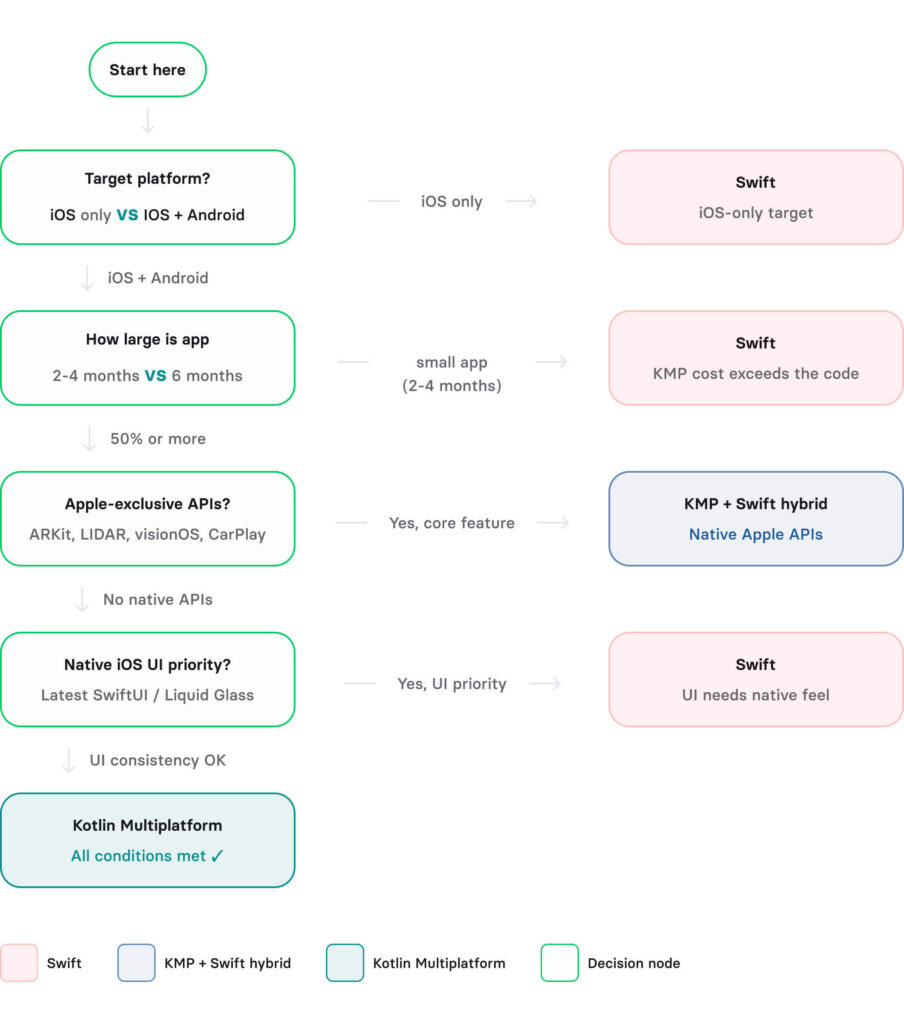
A logistics startup came to us planning to build a warehouse scanning app for both iOS and Android. They wanted to use KMP as the primary mobile development technology. The list of features for this solution included LiDAR scanning, real-time camera processing, and BLE communication with hardware scanners on the warehouse floor. We estimated that their native iOS layer would account for 65% of total iOS engineering work. KMP would have covered only the data sync and inventory rules layer. So, we recommended native Swift as the optimal technology for this project. The customer shipped faster, with less toolchain complexity and without managing a shared module that would cover less than a third of the product.
KMP use cases for iOS development
KMP is the right call when these conditions align:
- Shared business logic (APIs, data models, validation, business rules, etc.) makes up over 50%.
- Your project timeline exceeds three months, giving you enough runway to absorb the KMP setup cost.
- You’re building data-heavy products where hardware isn’t the core experience (for example, fintech, B2B SaaS, e-commerce, logistics, or booking).
Native Swift use cases for iOS development
Choose native Swift when:
- iOS is your only platform, or Android isn’t in the next 12 months.
- Your app is built around Apple hardware, such as AR, LiDAR scanning, GPS-heavy field tools, CoreML, CarPlay, and visionOS.
- You’re at the mobile app MVP stage with under three months to the first release.
- Your product depends on the latest Apple UI (Liquid Glass, Live Activities) at launch and needs to provide a fully-native interface.
- Your app’s native layer runs above 50% of total iOS engineering.
In sum, the decision follows the shape of your iOS code, not the technology hype.
The bottom line
KMP is a solid, production-ready technology. For iOS + Android products where business logic is the dominant engineering effort, it can cut dual-platform cost and project duration by 30-45%. For products where Apple hardware is core to the experience, the native iOS layer grows past the point where KMP earns back its overhead. Native Swift is the cleaner call.
It is worth mentioning that JetBrains is currently working on Swift Export (experimental in Kotlin 2.2.20). It would give KMP direct access to Swift-only APIs by eliminating the Objective-C bridge. If it reaches stability, several of the limitations listed in the native API table above are reduced or eliminated, making KMP a strong bet for 2026.
Our team has built both kinds of products. Talk to us about your project, and we’ll help you decide which path fits your app, your team, and your timeline.
- Hire Swift Developers – for iOS-native projects
- Hire Kotlin Multiplatform Developers – for cross-platform iOS + Android
For a deeper look at our cross-platform mobile development expertise, check out the Purple Connex case study.
Questions & Answers
FAQ
What are the limitations of KMP cross-platform mobile app development for iOS?
KMP is still evolving and may not fully support the latest iOS-specific UI patterns and system features out of the box. For instance, push notifications, GPS, AR, in-app purchases, sensors, and WidgetKit all require native Swift. This issue often requires bridging to Swift/Objective-C for deeper iOS integration, which can add complexity.
When is native app development for iOS with Swift an optimal approach?
Swift is the best choice when your product is iOS-first and relies heavily on native UI, performance, and deep integration with Apple’s ecosystem. It’s especially suitable for apps that need device-specific iOS features, smooth UI/animations, and predictable App Store review processes.
When to choose KMP for iOS development?
KMP is a strong option when you want to share a significant portion of business logic across iOS and Android. It works well for data-heavy projects or projects that exceed at least three months, where consistency and code reuse matter more than fully native UI implementation or hardware capabilities.
What does it cost to switch from Swift to KMP later?
There is no need to rewrite the iOS app. You extract business logic into KMP modules incrementally. Typically, the setup takes 1-2 weeks. Migrating networking and data models takes 2-4 weeks for the first module. To minimize risks, go module by module. An optimal approach looks as follows: ship Swift first, validate the product, then add KMP when Android is confirmed.
How can Volpis help me leverage Swift or KMP for iOS development?
Volpis helps you choose the right approach based on your product goals, business logic, timeline, and specific features. We can help you build a fully-native Swift app or a KMP-powered cross-platform solution and take maximum advantage of both technologies.