
- Dynamic route optimization re-plans routes mid-day when orders, traffic, or vehicles change.
- It runs a loop: plan, execute, monitor, and re-plan on live data.
- Fuel is about a fifth of truck operating cost (about $0.48 of $2.336 per mile, ATRI 2025 data). Labor and on-time gains matter as much.
- In most cases, data quality and driver buy-in decide the result more than the algorithm does.
Most routes are planned in advance. They’re based on yesterday’s orders, average traffic, and a full driver roster. On many days, at least one of those inputs changes before noon. As a result, the route stops matching what’s happening on the road.
Fixing routes by hand is the hard part. Each change has to consider things like time windows, vehicle capacity, and driver hours at the same time. A dispatcher can manage that for a few vans. But across a whole fleet, manual re-planning turns into guesswork. You end up paying for it in late stops, overtime, and extra miles.
Dynamic route optimization software fixes this by re-planning routes while vehicles are still on the road.
With over 10 years in the industry and 15 fleet management products built, I wrote this guide, drawing on our experience building routing, tracking, and dispatch features. It explains how dynamic route optimization works, what it delivers, and how to implement it.
What Is Dynamic Route Optimization?
Dynamic route optimization is the continuous re-planning of vehicle routes using live data. The system tracks orders, traffic, vehicle positions, and driving hours. When an event makes the current plan worse, it re-solves the remaining stops and sends updated routes to drivers.
A dynamic system doesn’t restart the day. It re-solves only the stops that remain, and only for the vehicles the event touches. That’s why it needs live access to your order, telematics, and driver data.
Dynamic vs. static route planning
Both approaches solve the same routing problem, and both can show live ETAs. The difference is whether the plan, the stop order, and the vehicle assignment are re-solved after dispatch. Drivers execute a static plan as built. A dynamic plan is a starting point that changes during the day.
| Aspect | Static route planning | Dynamic route planning |
|---|---|---|
Decided before dispatch | The full plan: sequence and assignment | A starting plan, treated as provisional |
During the day | Drivers execute the plan; dispatcher handles exceptions by hand | The system re-solves the remaining stops when some event changes the picture |
New order arrives | A dispatcher adds a new order, or it’s held for the next day | The system inserts the order where it costs least, across all vehicles |
Delay or breakdown | Stops slip, or a dispatcher reassigns them manually | System re-sequences or reassigns affected stops |
Use of live traffic | Navigation and ETA updates; the sequence stays fixed | ETA updates, and deciding whether to re-plan |
Best fit | Repeating routes with stable demand | Days where much of the work appears or changes after dispatch |
Don’t confuse dynamic routing with rerouting in a navigation app. Navigation changes the road between two stops. Dynamic routing changes which stops a vehicle serves and in what order.
Which operations benefit from dynamic routing?
The best predictor of value is how much of the day is unknown at dispatch.
| Operation | What changes after dispatch | What re-planning does |
|---|---|---|
Last-mile delivery | Failed deliveries, traffic, and same-day orders | Re-sequences dense routes, keeps customer ETAs accurate |
Field service | Job overruns, emergency calls | Reassigns jobs by technician skill, location, and hours left |
Distribution and wholesale | Add-on orders, returns, and loading delays | Inserts stops without breaking capacity or delivery windows |
Couriers and on-demand fleets | Most of the route, since new pickups arrive all shift | Assigns each new job to the best-placed vehicle |
Waste collection | Missed bins, overflow calls, and full trucks mid-route | Reorders stops around the transfer station tripReorders stops around the transfer station trip |
How does dynamic route optimization work?
A dynamic routing system runs one loop all day: plan, execute, monitor, and re-plan. A 2023 study in the journal TOP compared two triggers: re-planning the moment a new order arrives, and re-planning when the vehicle reaches its next stop. Waiting for the vehicle to reach its stop gave better routes in most tested cases.
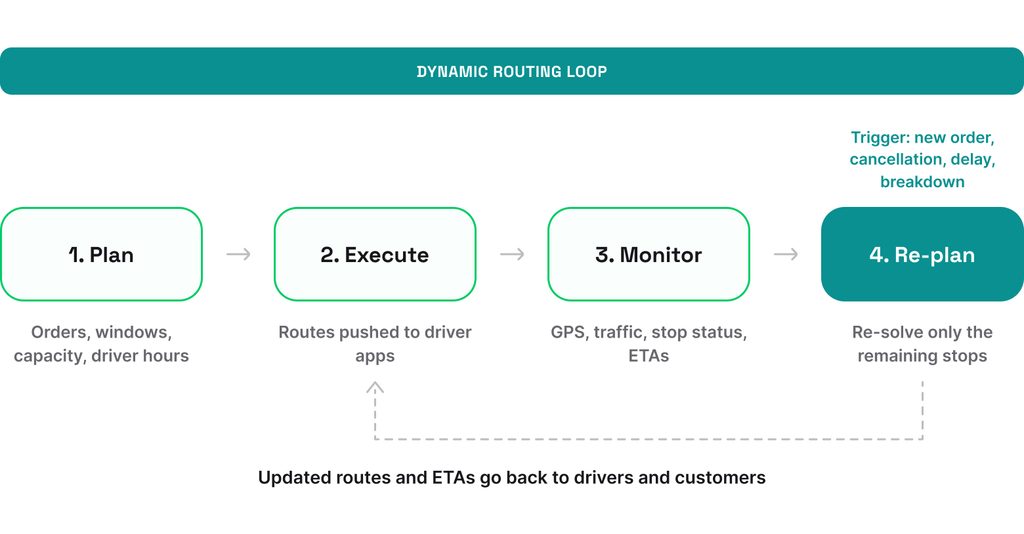
Never change the stop a driver is already heading to. Changing a destination mid-turn confuses the driver and costs trust.
Data a dynamic routing system needs
The system is only as good as its data. Six inputs do most of the work:
| Input | What it tells the system | Typical update |
|---|---|---|
GPS positionsGPS positions | Where each vehicle is, and which stops are done | Every 30 seconds to 5 minutesEvery 30 seconds to 5 minutes |
Live traffic | How long each road segment takes right now | Every 1-5 minutes |
Weather | How much slower roads and stops will be | From every 10-15 minutes to every hour |
Delivery windows | When each customer can receive a delivery | When an order changes |
Vehicle capacity | How much weight, volume, and equipment each vehicle has left | After each load change |
Driver skills and hours | Which jobs each driver can do and how long they can still work | When a driver clocks in, takes a break, or logs hours |
An ELD log isn’t a tracking feed. Under 49 CFR 395.26, the device logs location at duty-status changes and at least every hour of driving without another record. Many ELD units also stream a separate telematics feed at a higher frequency, and that’s the telematics feed behind the loop.
The algorithms behind dynamic route optimization
Dynamic routing systems are built on the vehicle routing problem (VRP). The solver takes vehicles, stops, and constraints, and looks for the cheapest set of routes that meets all requirements. A constraint in this case is any rule a route must follow – a delivery window, a weight limit, a driver’s legal hours, or a low bridge.
Let’s put it in numbers. One vehicle with 10 stops has 181,440 possible tours. With 20 stops, the count passes 60 quadrillion. Add time windows and it gets worse.
Checking every option isn’t possible, so systems combine three layers:
- Heuristics: fast rules that build a good initial route. The layer inserts each new stop where it adds the least cost.
- Metaheuristics: search methods that improve a route by swapping, moving, and reversing stops.
- Machine learning: models that predict the solver’s inputs.
Machine learning doesn’t replace the solver – it just provides better numbers. The next layer up is AI agents for fleet management. They watch the loop and propose the re-plan before a dispatcher asks. Mature open-source solvers exist too, including Google’s OR-Tools, VROOM, and PyVRP.
In our fleet projects, the solver was rarely the hard part. The hard part was encoding the real constraints – dock hours, truck restrictions, driver skills – into the model.
On Road Hunter, routes had to respect hazmat, height, and weight limits before any ordering logic mattered.
How are routes re-planned in real time?
Re-planning starts with a trigger. We group these triggers into four kinds:
- Demand: a new or canceled order.
- Network: a closed or congested road.
- Vehicle: a breakdown or a full truck.
- Regulation: a driver running out of legal hours.
When a trigger fires, the system doesn’t rebuild the whole plan. It re-solves only the stops that remain, and only for the vehicles the event affects.
The regulatory trigger is one of the easiest to overlook. Under federal hours-of-service rules, a property-carrying CMV driver gets up to 11 driving hours inside a 14-hour on-duty window. For example, a 2-hour delay in the morning will push the last three stops past the driver’s legal hours. A dynamic system sees that and moves those stops. Our guide to fleet compliance covers those rules in depth.
Dynamic routing doesn’t replace the dispatcher. The job shifts from rebuilding routes by phone to approving proposals and handling exceptions.
What are the benefits of dynamic route optimization?
Most measured savings come from optimizing routes in the first place. The dynamic part protects those savings on days that don’t go to plan.
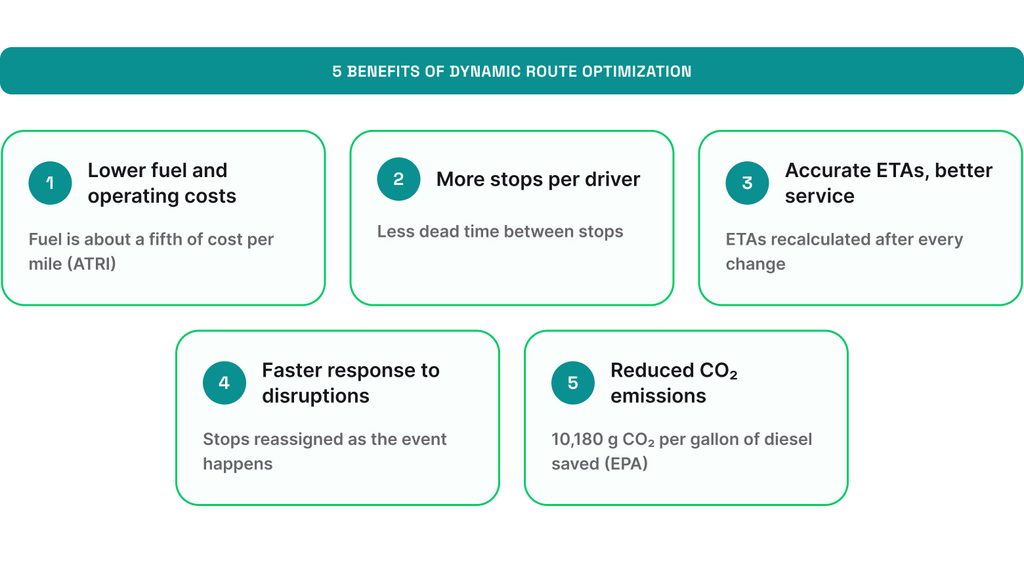
Benefit 1: Lower fuel and operating costs
The mileage savings show up in labor as much as at the pump. A routing model tested in a 2026 Networks study cut costs 17.4%-36.4% against manual plans at a Norwegian retail chain. Routing is one of several ways to reduce fleet costs, and often the fastest.
Benefit 2: Less driver time wasted
The same shift fits more stops when drivers don’t drive to canceled addresses or wait for delivery windows to open. In Portland’s curbside collection, driver wages cost about 8 times more than fuel, according to Portland’s 2026-27 rate study. An hour of idle driver time costs more than the fuel bill suggests.
Benefit 3: Better customer experience
When an ETA slips past its window, the system re-sequences or reassigns the stop instead of only reporting the delay. In a 2025 simulation in Scientific Reports, such an approach raised on-time delivery from 68.1% to 92.8%. The test covered 47 customers and four vehicles.
Benefit 4: Faster response to disruptions
When a truck breaks down or a road closes, the system proposes a new plan within a short period of time. The dispatcher doesn’t have to build a new route by hand; they approve a reassignment.
Benefit 5: Reduced CO₂ emissions
Each gallon of diesel a truck doesn’t burn keeps about 10 kg of CO, according to the US EPA. Emissions fall about as much as mileage does.
What are the challenges and limitations of dynamic routing?
In our experience, dynamic routing projects stall for three reasons: bad data, weak integrations, and drivers who don’t trust the route. Two more limits are worth planning for: API costs that grow with every re-plan, and fleets that don’t need real-time re-planning at all.
Challenge 1: Poor data quality
The problem
A solver trusts whatever data you feed it. A geocode that’s 200 yards off sends the driver to the wrong gate. A service time set to 5 minutes for a 20-minute unload breaks every window after it.
What to do
- Validate addresses when the order is entered, not when the driver arrives.
- Record real service times from the driver app for a few weeks, then replace the defaults.
- Check that GPS positions arrive as often as the refresh table above shows.
Challenge 2: Complex system integration
The problem
Orders, loads, and positions usually live in three separate systems that don’t talk to each other. Nightly batch exports are fine for static planning. Dynamic routing needs updates within minutes.
What to do
- Start with three data flows only: orders in, positions in, and routes out.
- Use APIs and webhooks over file exports.
- Make one system the owner of each field, so two systems never edit the same time window.
Challenge 3: Low driver trust
The problem
The challenge was built on the idea that experienced drivers’ sequences carry knowledge the model lacks. In our experience, drivers deviated for parking spots, gate codes, and which dock opens late.
What to do
- Let drivers reject an instruction with a reason, then review those reasons weekly. Each one points to a data error or a missing constraint.
- Push changes only when the vehicle is parked, and keep acceptance to one tap on a mounted device. Under 49 CFR 392.82, a CMV driver stopped in traffic still counts as driving.
Challenge 4: Rising API costs
The problem
Most routing APIs charge per shipment or per request, and every re-plan counts. Google Maps Platform charges $30 per 1,000 shipments for fleet routing for the first tier (up to 100,000 events). Re-plan 500 shipments 10 times a day, and you pay for 5,000 shipments.
What to do
- Re-solve only the routes an event affects, not the whole fleet.
- Estimate the monthly bill at your real re-plan rate before you commit.
- Weigh an open-source solver such as OR-Tools or VROOM. It removes the per-shipment fee and adds hosting and engineering cost.
Challenge 5: Limited value for stable routes
The problem
Fleets with repeating routes and steady demand gain little from mid-day re-planning. Their drivers lose the benefit of knowing their territory.
What to do
- Measure before you buy. The smaller the share of stops that change after dispatch, the less a re-planner has to do.
- Go hybrid if changes are rare but costly.. Keep the fixed plan, and use dynamic insertion only for same-day changes.
Three of the five challenges above sit outside the routing engine: data, integration, and the driver app. That’s the part we build for fleet companies: driver apps with offline sync and one-tap acceptance, telematics and TMS integrations that deliver updates within minutes, and a constraints layer set up for your vehicles and rules.
See our fleet software development services
How to implement dynamic route optimization: 5 steps
Implementation takes five steps: audit, define KPIs, choose your software, integrate, and pilot.
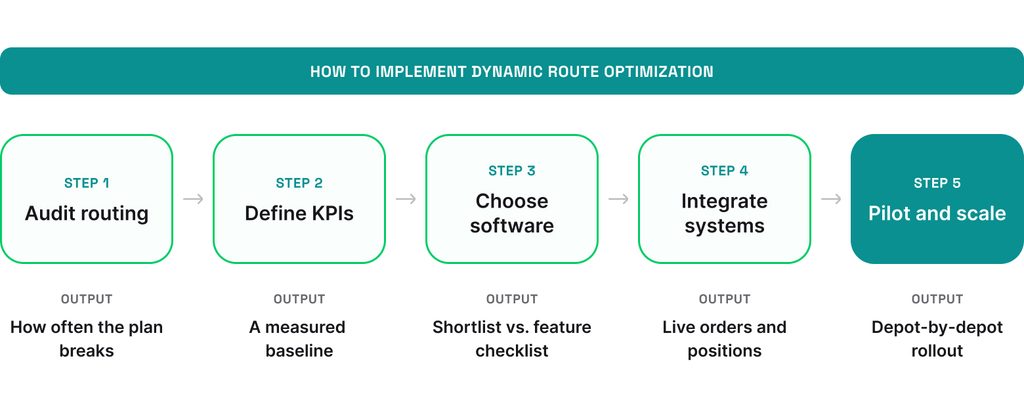
Step 1: Audit your current routing process
Map how routes are made now, and measure how often they change after dispatch. In our experience, 2 weeks of data is enough as that’s two full weekly cycles. Pay attention to:
- Who builds routes, with which tool, and how long it takes.
- How many orders arrive, change, or cancel after dispatch each day.
- Which constraints live only in the dispatcher’s head.
- Where position data comes from, and how often it updates.
- How many stops miss their window, and why.
In our experience, the second bullet matters most. The more the day changes after dispatch, the more work a re-planning system takes off your dispatchers.
Step 2: Define KPIs and baseline
Measure these 5 KPIs for two weeks before the pilot:
| KPI | How to calculate it | Why it matters |
|---|---|---|
Cost per stop | Total route cost divided by completed stops | Captures fuel, labor, and vehicle cost in one number |
On-time rate | Stops served inside their window divided by all stops | Tracks whether you keep your promise to customers |
Miles per route | Total miles divided by routes run | Tracks fuel and emissions |
Overtime hours | Driver hours beyond the planned shift, per week | Tracks labor, often the biggest source of savings |
Planning time | Dispatcher hours spent building and fixing routes, per week | Tracks time saved in the office |
Step 3: Choose dynamic routing software
You have three options: buy a routing product, build on a routing API, or build on an open-source solver. Buy when your constraints are standard. Build when your constraints are your edge.
| Approach | What it is | When it fits | How you pay | What stays yours |
|---|---|---|---|---|
Buy a routing product | A finished tool: you upload orders and vehicles, and it plans and re-plans inside its own app | Standard constraints, and you want to start in weeks | Per driver or per stop, monthly | Data and configuration; app and the data model is vendor’s |
Build on a routing API (Google, HERE, Mapbox) | A solver you call from your own software, so you keep your driver app and data model and pay per request | Custom constraints, or you need your own driver app | Per shipment or per request, and each re-plan bills | The app and the integration, solver is vendor’s |
Open-source solver (OR-Tools, VROOM, PyVRP) | The code you host and tune yourself, with no per-use fee and full responsibility for it. | High volume, or constraints no product supports | No per-use fee. Hosting and engineering cost instead | Everything you build and host, solver is open source |
A separate question is who will build your system. The API and open-source paths need a mobile and backend team, either in-house or from a partner. In the second case, the contract you sign with the partner decides what you own at the end.
Whichever path you take, check if your software:
- Re-plans when events happen, not only on a schedule.
- Handles your real constraints – time windows, capacity, skills, driver hours, and truck attributes.
- Offers a documented API and webhooks for orders, positions, and route updates.
- Includes a driver app with offline mode and one-tap route acceptance.
- Sends updated ETAs to customers automatically.
- Let dispatchers lock stops and override the system.
- Has pricing that stays predictable as re-planning volume grows.
- Reports the KPIs you defined in Step 2.
Step 4: Integrate with TMS, ERP, and telematics
The routing system needs live data from three sources and sends results to two places:
- In: orders from the ERP or order system, loads and statuses from the TMS, and vehicle positions from telematics.
- Out: routes go to the driver app, ETAs go to customers.
- Back: stop events return to the routing system from the driver app and geofences.
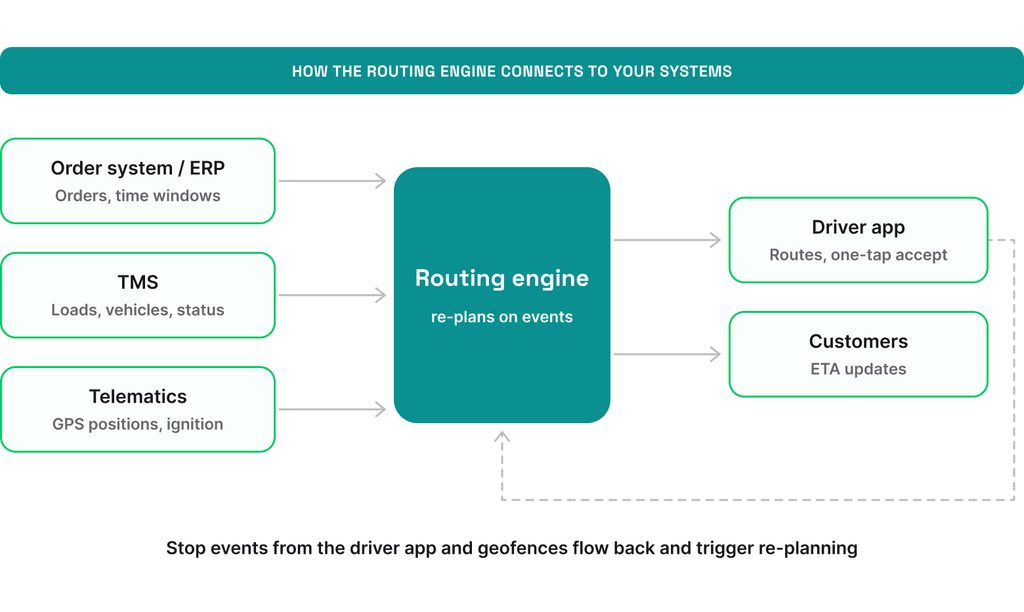
Decide early which system owns each piece of data. If the TMS and the routing system both edit a stop’s time window, they’ll disagree. Geofences help here. Arrival and departure events close stops automatically, as we explain in our guide to geofencing in logistics.
In fleet apps, the driver’s phone is the least reliable link. Coverage drops in depots, tunnels, and rural areas. We design driver apps to work offline and sync when the signal returns. A re-planned route that never reaches the driver saves nothing.
Step 5: Pilot, train drivers, and scale
We run pilots on one depot or 10-20 vehicles for 4-6 weeks. Then we recommend to:
- Run the system in shadow mode for a week, and compare its routes with your dispatcher’s.
- Train drivers on why routes change, not only on which button to press.
- Fix the data errors the pilot surfaces.
- Share KPI results with drivers and dispatchers, not only with management.
- Roll out to more depots one at a time.
Is dynamic route optimization right for your fleet?
Dynamic route optimization pays when three things hold: your plans change after dispatch, your data arrives fast enough to act on, and your drivers trust the routes on their screens. If you’re considering it, keep these points in mind:
- Audit how often the plan breaks before you buy anything.
- Measure cost per stop and overtime, not only fuel.
- Treat integration and the driver app as the main work.
Some constraints won’t fit an off-the-shelf product. For those, we offer custom fleet management software development, from the driver app to the routing layer. Need map expertise only? You can directly hire map developers from our team.
Questions & Answers
FAQ
Is dynamic route optimization the same as dynamic routing in networking?
No. Dynamic routing in networking uses protocols like BGP and OSPF to choose paths for data packets between routers. Dynamic route optimization plans vehicle routes under time windows, capacity, and driver-hour rules.
How often should routes be re-optimized?
On events, not on a timer. Useful triggers include a new order, an ETA slipping past its window, and a vehicle going offline.
Can you use Google Maps for dynamic route optimization?
Not the consumer app. According to Google’s help pages, it allows you to add a starting point and up to nine additional stops, including the destination, and Maps visits them in the order you enter them. It doesn’t handle time windows or vehicle limits. Google’s separate Route Optimization API handles those constraints and bills per shipment.
How long does implementation take, and when does it pay back?
A pilot at one depot usually takes 4-6 weeks. Payback depends on how much of your day changes after dispatch.
Is it legal to track drivers for dynamic routing?
Yes, with conditions: tell drivers what’s tracked and why. In the EU, the Article 29 Working Party advises that employee consent is rarely valid. Tracking rests on legitimate interest plus a written privacy notice. Track the vehicle during the shift, not the person after it.